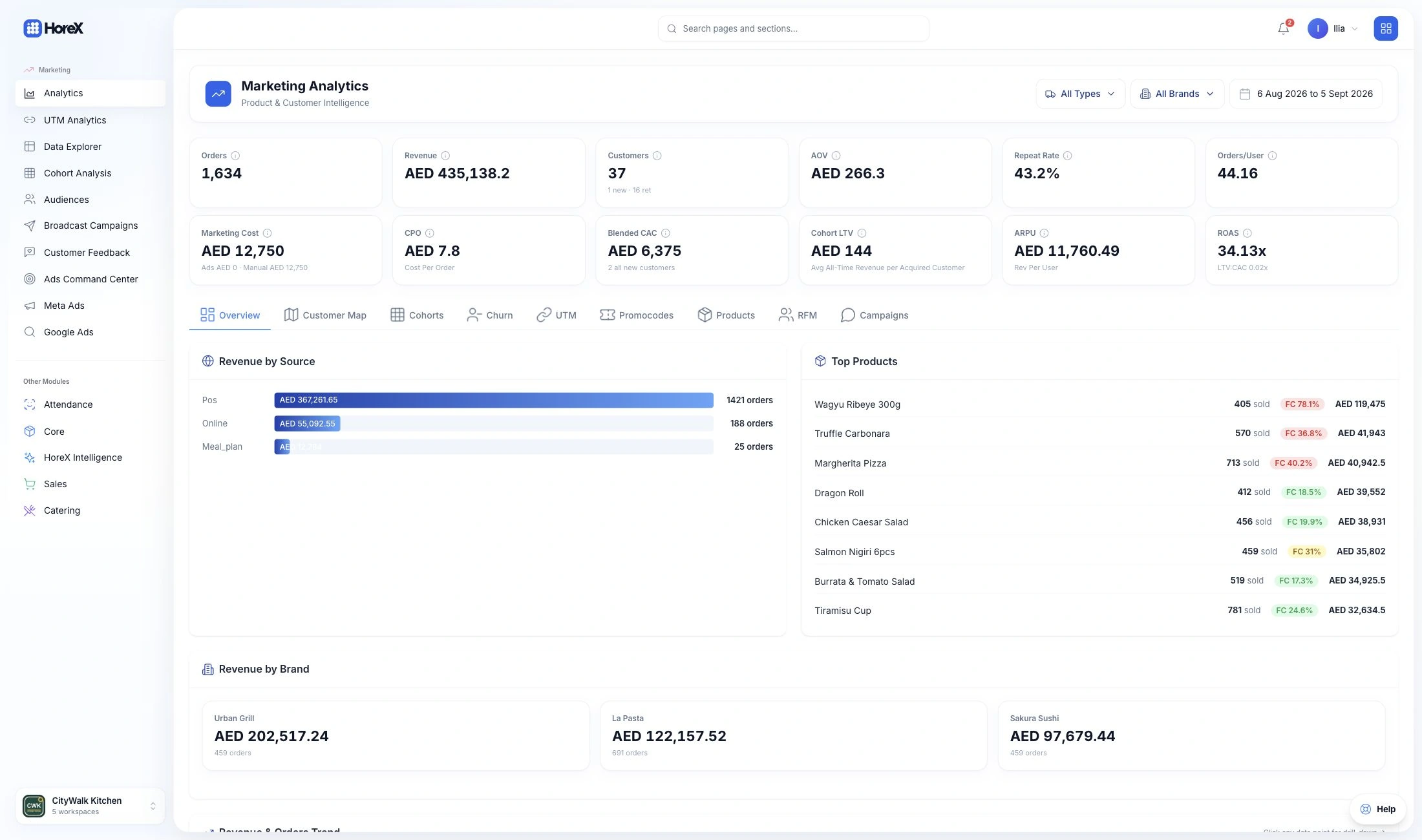
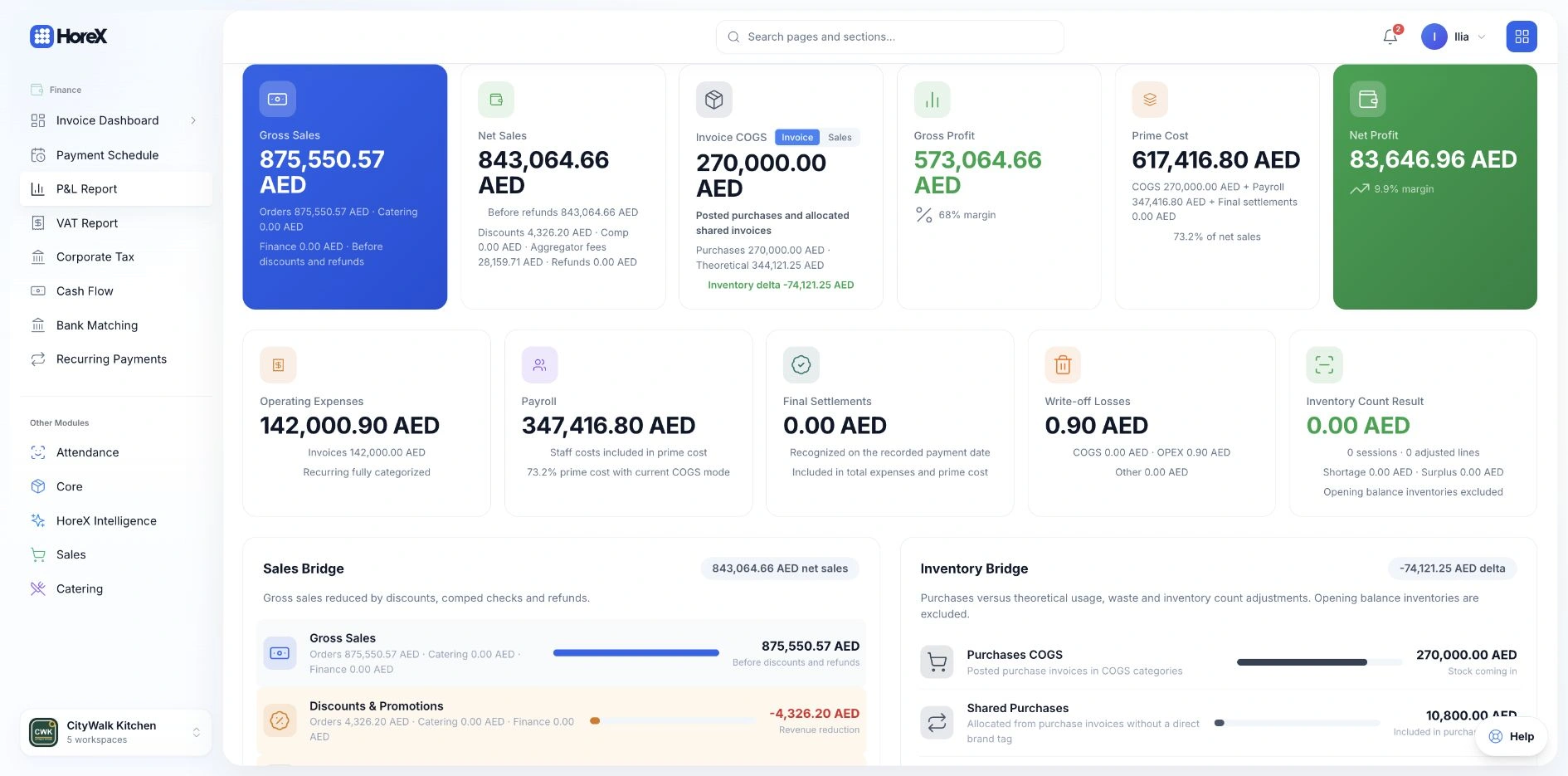
Review sales, food cost, payroll and operating expenses in the Profit & Loss report. The figures are connected to the underlying sales, purchasing, expense and stock records.
Break down revenue by concept, branch or service type. Compare periods and open the records behind a total to understand changes in costs and margins.
Auto-generated P&L
Per-concept breakdown
Food cost tracking
Period comparison
Revenue by service type
Real-time margins
Branch-level reporting
Category-level drill-down
02 / Customer documents
Quotations, invoices and payment status.
Prepare a customer quotation, convert it to a tax invoice and send the PDF by email. Documents use the selected legal entity's branding, TRN and bank details.
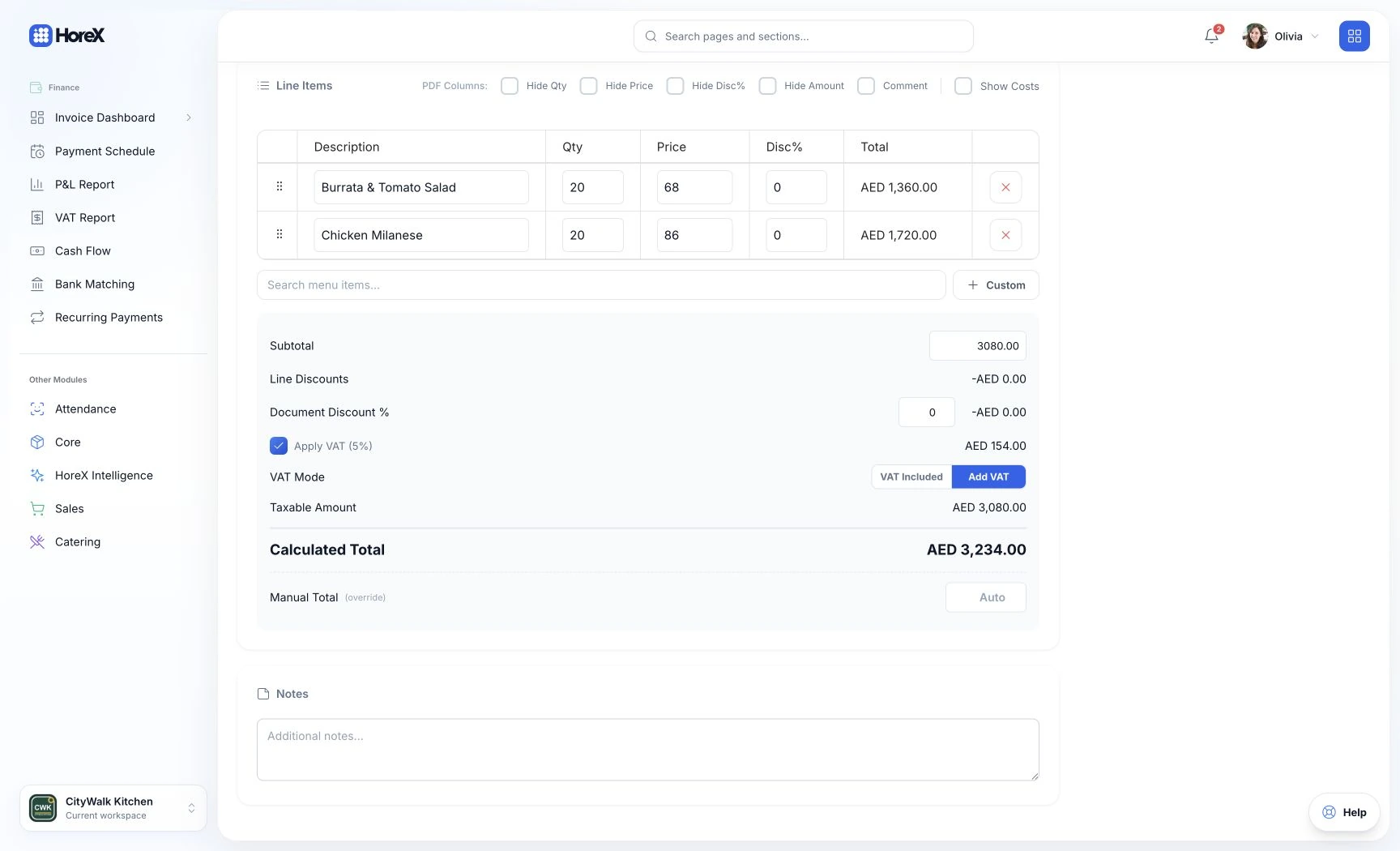
Use the same workflow for catering events, corporate meals and other services. Follow payments, overdue balances and document history. The example shows the line items and calculation while a quotation is being prepared.
Quotation → Invoice conversion
PDF generation
Email delivery
Payment tracking
Overdue detection
Multi-legal entity
Audit trail
Terms & conditions templates
03 / VAT
Input and output VAT. Reports by tax period.
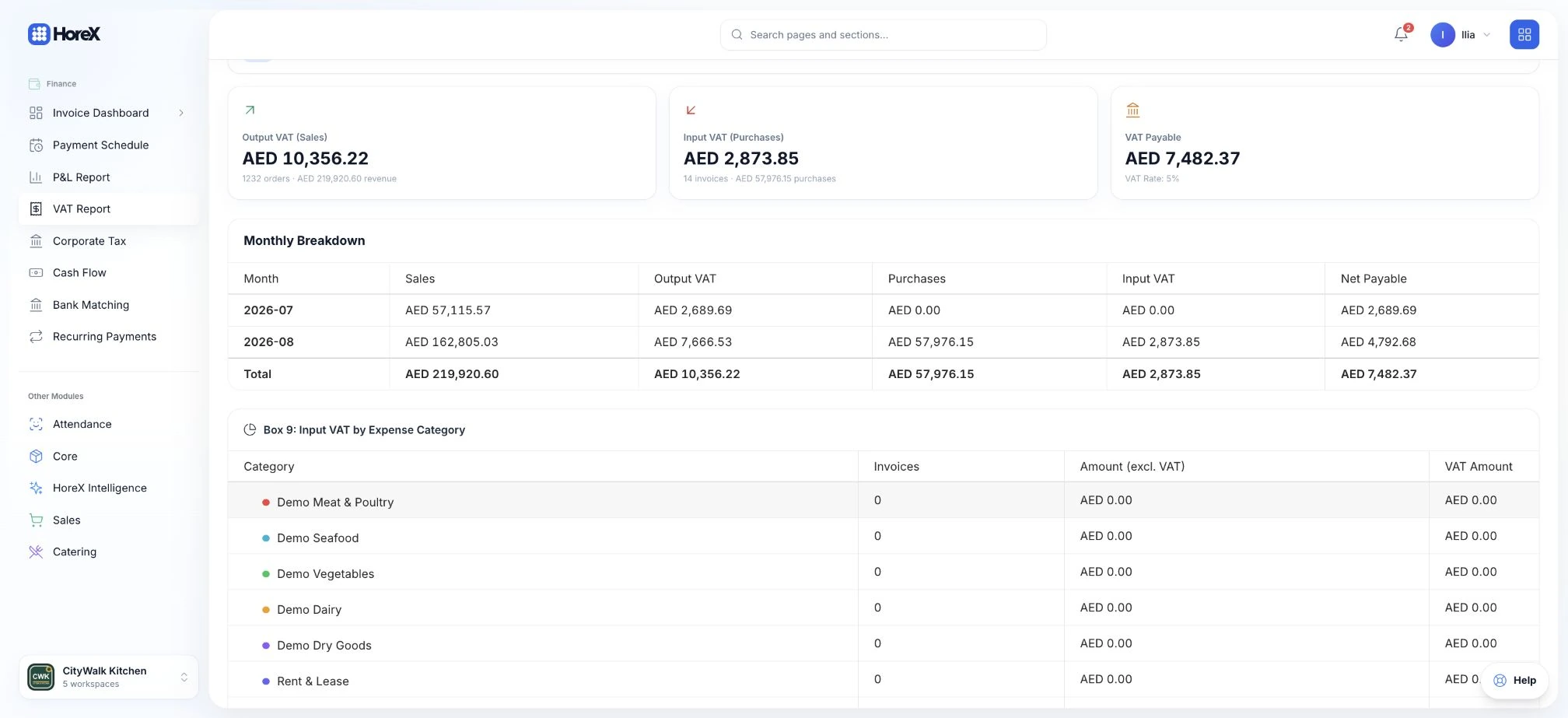
Review VAT recorded on sales, purchases and invoices by tax period. The report separates input and output tax and provides the transaction records behind the totals.
The reporting workflow includes standard-rated, zero-rated and exempt supplies, Form 201 mapping and FAF export. Use the period summary and supporting records to prepare the figures for your accountant.
Auto VAT calculation
FTA Form 201 mapping
FAF export files
Period configuration
Input/output VAT split
Multi-rate support
Tax invoice compliance
Audit-ready reports
04 / Food cost
Ingredient prices and menu margins.
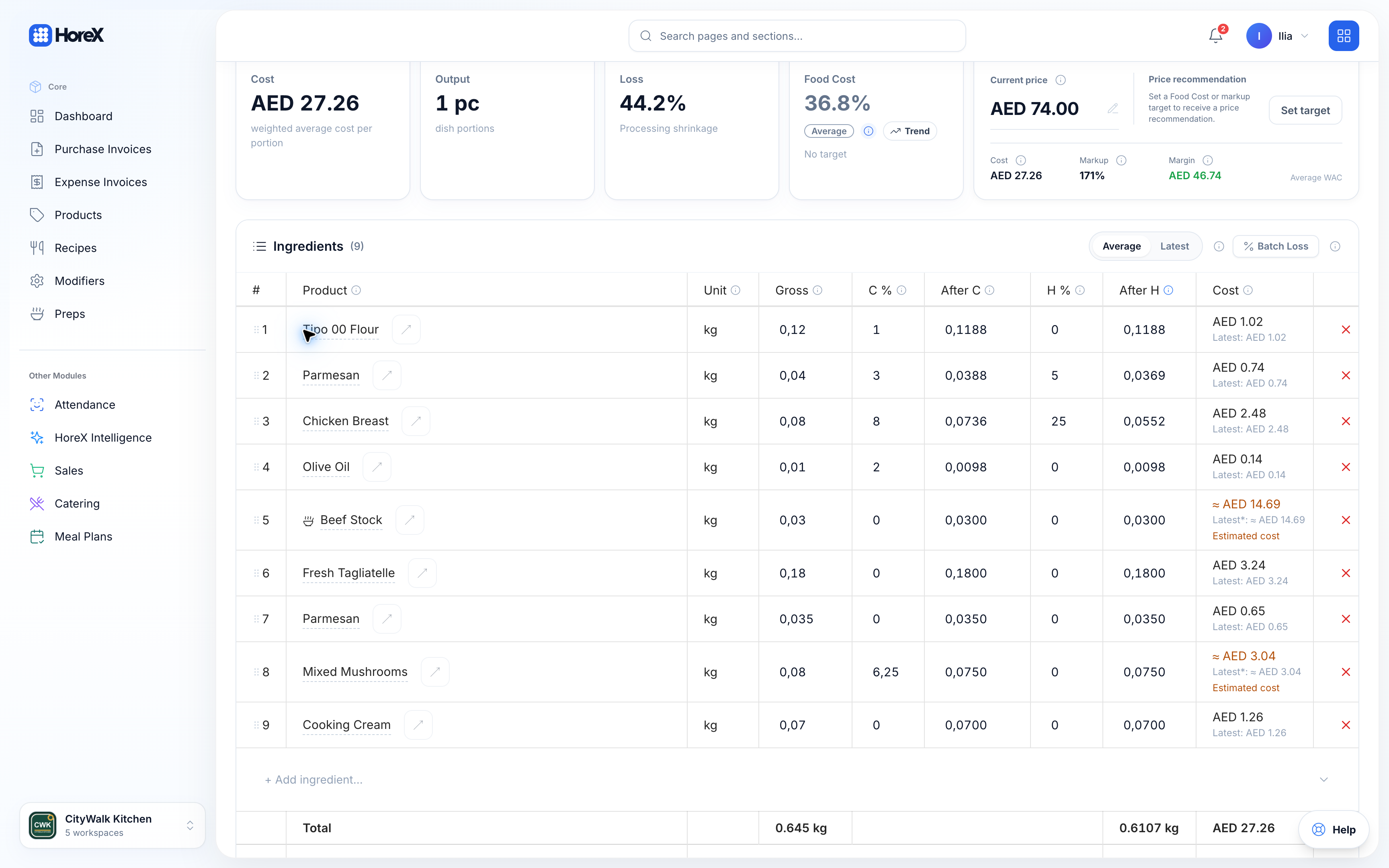
Recipe cards combine ingredient weights, preparation losses and Weighted Average Cost prices. When a posted supplier invoice updates an ingredient price, the recipes using it are recalculated.
Review a dish's cost alongside its selling price and margin. Compare expected recipe consumption with recorded usage to investigate waste or portion differences. The ingredient table shows the quantities and prices behind the calculation.
Auto recipe costing
WAC ingredient pricing
Loss coefficients
Theoretical vs actual
Margin alerts
Portion drift detection
Supplier price trends
Menu engineering data
Full feature list
Financial Management features
Open a feature for the full workflow and details.
Profit & Loss
Auto-generated P&L with revenue, COGS, and expense breakdown. Real-time, per-concept, per-branch.
See details+
Profit & Loss
A P&L that writes itself — from every sale, purchase, and expense.
Traditional restaurant accounting is reactive — you wait until month-end, export CSVs, and reconcile in spreadsheets. HoreX flips this by capturing financial data at the point of origin: every POS sale, every supplier invoice posted, every write-off, every expense logged — all feed directly into a real-time P&L.
Break down revenue by concept, branch, delivery channel, or service type. See your COGS calculated from actual ingredient consumption, not estimates. Compare periods side-by-side to spot trends, seasonality, and margin erosion before it hits your bank account.
How it builds itself
POS sales record revenue by category, concept, and payment method — in real time
Supplier invoices post to COGS with WAC pricing; recipe write-offs track actual consumption
Expenses are logged and categorized — P&L updates instantly with full drill-down
P&L capabilities
Real-time generation
Revenue by concept & branch
COGS from actual consumption
Multi-period comparison
Expense categorization
Food cost percentage
Service type breakdown
Export to CSV/PDF
Invoice management
Create, send, track, and collect. Full quotation-to-payment lifecycle with PDF and email.
See details+
Invoice management
From quotation to payment — the full document lifecycle.
Whether you're billing for a catering event, a corporate meal package, or ad-hoc services, HoreX gives you a unified invoice engine. Create professional quotations with itemized pricing, convert them to tax invoices from the same workflow, send them by email with branded PDF attachment, and track payment status through to collection.
Each document automatically carries the correct legal entity branding, TRN, bank details, and optional attachments like trade licenses and VAT certificates. Set due dates, detect overdue invoices, send payment reminders, and record partial payments — all with a full audit trail.
Document lifecycle
Create a quotation with client details, line items, and terms
Convert to tax invoice — number, due date, and legal entity auto-applied
Send via email, track payment, mark as paid — full history retained
Invoice features
Quotation → Invoice flow
Branded PDF generation
Email delivery
Due date & overdue alerts
Partial payment tracking
Multi-legal entity
Terms templates
License & VAT cert attachments
Real-time VAT reports
UAE FTA-ready VAT reporting. Automatic calculation, period tracking, and FAF export.
See details+
VAT compliance
UAE FTA-ready VAT — calculated, aggregated, and exportable.
Every transaction in HoreX — POS sales, supplier invoices, expense entries — automatically calculates and records VAT. At any point, you can generate a complete VAT summary for any period, broken down by input and output tax, standard-rated, zero-rated, and exempt supplies.
Generate FAF (FTA Audit File) exports for submission, view the Form 201 box mapping for your VAT return, and configure fiscal periods to match your filing schedule. Your accountant gets clean, structured data instead of a pile of receipts.
How it works
VAT is calculated automatically on every transaction based on rate configuration
Input and output VAT are aggregated by period with full transaction-level drill-down
Export FAF files or view Form 201 mapping for your VAT return filing
VAT features
Auto-calculation on all transactions
5% standard rate support
Zero-rated & exempt handling
FTA Form 201 mapping
FAF export generation
Period-based reporting
Input/output VAT split
Audit-ready detail
Food cost tracking
Real-time food cost by recipe, category, and concept. WAC-based ingredient pricing.
See details+
Food cost tracking
Know your real food cost — ingredient by ingredient, in real time.
Food cost is the single biggest controllable expense in any restaurant. HoreX tracks it at the deepest level: every recipe has a recipe card with exact ingredient quantities, brutto/netto weights, and loss coefficients. When a POS sale is made, ingredients are deducted by recipe — giving you actual consumption data, not estimates.
Ingredient costs are calculated using 90-day Weighted Average Cost from posted supplier invoices. When a new invoice is posted, every recipe cost in your system recalculates automatically. You see food cost percentage by dish, category, concept, and total — updated in real time.
How costs flow
Supplier invoices are posted — ingredient unit costs update via 90-day WAC
Recipe costs recalculate automatically based on recipe card ingredient weights and WAC prices
POS sales trigger recipe-based write-offs — actual food cost updates in real time
Food cost features
Per-recipe cost calculation
WAC from supplier invoices
Auto write-off on POS sale
Theoretical vs actual comparison
Loss coefficient support
Brutto/netto tracking
Category-level aggregation
Margin alert system
Cash flow
Track money in and out across all channels. Daily, weekly, monthly views with trend analysis.
See details+
Cash flow
Track every dirham in and out — across all channels.
Cash flow visibility is critical for restaurant operations. HoreX aggregates all money movements — POS sales by payment method, supplier payments, expense disbursements, and invoice collections — into a unified cash flow view. See daily, weekly, or monthly summaries with trend analysis.
Z-reports from shift closings feed directly into cash flow. Track declared cash vs. system-calculated amounts, detect discrepancies early, and maintain a clear audit trail of all cash handling across every terminal and operator.
Supplier payments, expenses, and invoice collections are recorded
Cash flow dashboard shows net position with trend lines and anomaly detection
Cash flow features
Multi-channel aggregation
Payment method breakdown
Daily/weekly/monthly views
Trend analysis
Z-report integration
Discrepancy detection
Per-terminal tracking
Export capability
Expense management
Log, categorize, and allocate expenses by branch, concept, or cost center.
See details+
Expense management
Log, categorize, and allocate every operational expense.
Restaurant expenses go beyond food purchases — rent, utilities, salaries, maintenance, marketing, and dozens of other categories. HoreX lets you log each expense with proper categorization, branch allocation, and receipt documentation. Everything feeds directly into your P&L.
Create expense categories that match your accounting structure. Allocate costs to specific branches, concepts, or cost centers. Track recurring vs. one-time expenses and compare spending patterns across periods.
How it works
Log an expense with amount, category, branch, and receipt attachment
System allocates it to the correct P&L line and cost center
Expense analytics show spending patterns, comparisons, and anomalies
Expense features
Custom expense categories
Branch allocation
Receipt attachments
Recurring expense tracking
P&L integration
Period comparison
Cost center support
Multi-branch support
Shift Z-reports
Open/close shifts with declared cash. Auto-generated Z-report with discrepancy detection.
See details+
Shift Z-reports
Open, close, and audit every shift — down to the last dirham.
Every POS shift in HoreX has a structured lifecycle: open with a starting float, operate with full transaction logging, and close with a declared cash count. The Z-report compares declared amounts against system-calculated totals — highlighting discrepancies instantly.
Track revenue by payment method, operator, and time slot. See discount totals, void counts, and refund summaries per shift. All data flows into the centralized financial dashboard, so managers see real-time operational health without waiting for end-of-day reports.
Shift lifecycle
Operator opens shift with a declared starting float
All transactions are logged — sales, discounts, voids, refunds, payment methods
Shift closes with cash count — Z-report auto-generates with discrepancy analysis
Z-report data
Starting float declaration
Declared vs. system cash
Revenue by payment method
Discount & void summary
Per-operator breakdown
Refund tracking
Time-slot analysis
Discrepancy alerts
Supplier invoices
Post purchases, update ingredient costs, and feed data into P&L — all from one screen.
See details+
Supplier invoices
Post purchases, update costs, and feed your P&L — in one step.
Supplier invoice posting is the backbone of accurate food costing. When you receive goods and post the invoice in HoreX, ingredient costs update using 90-day Weighted Average Cost, stock balances increase, and COGS entries flow into your P&L — all automatically.
Upload invoice photos using AI-powered OCR for automatic line item extraction. Match deliveries against purchase orders, track supplier pricing trends, and maintain a complete purchase history by product and vendor.
How it works
Receive goods and create an invoice entry with line items and quantities
Post the invoice — stock updates, ingredient WAC recalculates, P&L reflects COGS
Recipe costs across the entire menu update automatically based on new prices
Invoice features
AI-powered OCR upload
WAC price recalculation
Auto stock balance update
P&L COGS integration
Supplier price tracking
Purchase order matching
Multi-warehouse support
Batch posting
Multi-entity support
Multiple legal entities with separate TRN, bank details, and branding per concept.
See details+
Multi-entity support
Multiple brands, legal entities, and TRNs — one platform.
Restaurant groups often operate multiple brands under different legal entities — each with its own trade license, TRN, bank details, and brand identity. HoreX manages this complexity natively. When you generate an invoice or quotation, the correct legal entity is applied automatically based on the concept.
Each legal entity maintains its own logo, address, IBAN, and compliance documents. Consolidated reporting across entities gives ownership a group-level view, while entity-level reports serve individual brand management and regulatory compliance.
How it works
Configure legal entities with TRN, bank details, logo, and compliance docs
Link entities to concepts — invoices auto-inherit the correct branding
View reports at entity level for compliance, or consolidated for group management
Multi-entity features
Per-entity TRN & banking
Auto-branding on invoices
Trade license management
VAT cert attachments
Consolidated group view
Entity-level reporting
Concept-entity binding
Separate bank details
Bank reconciliation
Match bank transactions to system records. Spot discrepancies before they compound.
See details+
Bank reconciliation
Match bank statements to system records — catch every discrepancy.
Bank reconciliation is critical for restaurants with high transaction volumes. HoreX lets you import bank statement data and match it against system records — POS settlements, supplier payments, expense disbursements, and invoice collections.
The system highlights unmatched transactions and discrepancies, making it easy to identify missing entries, duplicate payments, or unexpected charges. Reconcile daily to prevent small issues from compounding into major accounting headaches.
Reconciliation process
Import bank statement data for the selected period
System auto-matches transactions against POS, invoices, and expenses
Review and resolve unmatched items — flag, categorize, or create entries
Reconciliation features
Auto-matching engine
Unmatched item highlighting
Multi-account support
Period-based reconciliation
Discrepancy categorization
Audit trail
Export reconciliation report
Recurring pattern detection
Revenue analytics
Sales by channel, time slot, product, and operator. Drill into what drives margin.
See details+
Revenue analytics
Understand what drives your revenue — and what doesn't.
Revenue analytics in HoreX goes beyond total sales. Drill down by time slot to find your peak hours, by product category to see what moves, by operator to track performance, and by channel to compare dine-in vs. delivery vs. takeaway profitability.
Interactive dashboards with filters, date range selectors, and comparison modes let you explore data from any angle. Spot underperforming menu items, identify your highest-value time slots, and make data-driven decisions about pricing, staffing, and menu engineering.
How to explore
Select a date range and optional filters — concept, branch, channel, operator
View revenue breakdown with interactive charts and drill-down tables
Compare periods, identify trends, and export data for further analysis
Analytics capabilities
Time-slot analysis
Product category breakdown
Channel comparison
Per-operator tracking
Interactive dashboards
Period comparison
Menu engineering data
CSV/PDF export
Document templates
Branded quotation and invoice templates. Terms & conditions, attached licenses, and VAT certificates.
Every quotation and invoice generated by HoreX is a professional, print-ready PDF. Your logo, legal entity name, TRN, and address appear in the header. Bank details are in the footer. Line items are formatted with proper pricing, discounts, VAT breakdown, and totals.
Configure terms & conditions templates to auto-attach to specific document types. Optionally include trade licenses and VAT certificates as additional pages. The result is a document your clients will take seriously — without you spending time in a word processor.
How templates work
Configure your legal entity details — logo, name, TRN, bank, address
Create terms templates for different use cases — catering, services, general
Generate documents — system auto-applies branding, terms, and attachments
Template features
Auto-branded headers
Bank details in footer
Configurable terms
License attachments
VAT cert attachments
Paid/unpaid/overdue stamps
Custom placeholders
Multi-entity support
Period management
Define fiscal periods, lock closed periods, and compare across quarters and years.
See details+
Period management
Define, lock, and compare fiscal periods with precision.
Financial data without proper period boundaries is noise. HoreX lets you define fiscal periods — monthly, quarterly, or custom — and lock closed periods to prevent retroactive modifications. This ensures your financial reports are consistent and audit-ready.
Compare any two periods side-by-side: revenue growth, cost changes, margin shifts. Use period-based VAT summaries for FTA filing. Lock periods once reconciled to maintain data integrity and prevent accidental backdating.
How it works
Define fiscal periods matching your accounting calendar
Run reports for any period — P&L, VAT, cash flow, food cost
Lock closed periods to prevent modifications and maintain audit integrity
Period features
Custom period definitions
Period locking
Side-by-side comparison
VAT period alignment
Retroactive entry prevention
Quarterly summaries
Year-end reporting
Export per period
Email invoices
Send invoices and payment confirmations via email with PDF attachment from the same workflow.
See details+
Email invoices
Professional invoices in the client's inbox from the same workflow.
Sending invoices shouldn't require downloading PDFs, opening email, and attaching files. HoreX generates the PDF and sends it via email from the same workflow — with professional formatting, your legal entity branding, and the correct recipient addresses pulled from the client profile.
Send quotations, invoices, and payment confirmations. Choose recipients from the client's contact list or enter custom addresses. The system logs every email sent with timestamp and recipient for your records.
How it works
Click "Send to Client" on any quotation or invoice
Select recipients from client contacts or enter custom email addresses
PDF is generated, attached, and delivered — all logged in the document history
Email features
One-click sending
Auto PDF attachment
Multi-recipient support
Custom email addresses
Payment confirmation emails
Send history logging
Client contact integration
Professional templates
Invoice dashboard
Total outstanding, overdue amount, recent activity — all KPIs on one screen.
See details+
Invoice dashboard
Every invoice KPI on one screen — outstanding, overdue, and recent activity.
The invoice dashboard gives finance managers an instant snapshot of accounts receivable health. Total outstanding amount, overdue invoices with aging breakdown, recently sent documents, and collection trends — all visible without a single click.
Drill down into any metric to see the underlying invoices. Filter by client, concept, or date range. Spot problematic accounts early and take action before receivables age out. The dashboard updates in real time as invoices are created, sent, and paid.
Dashboard components
KPI cards show total outstanding, overdue amount, and invoice count at a glance
Aging analysis breaks down receivables by 30/60/90+ day buckets
Company profiles with TRN, billing address, payment terms, and full document history.
See details+
B2B client registry
Complete client profiles — with every document, payment, and interaction.
B2B relationships require more than a name and email. HoreX maintains full client profiles with company name, TRN, trade license, billing address, payment terms, and multiple contact persons. Every quotation and invoice is linked to the client, building a complete financial history.
View a client's total revenue, outstanding balance, payment patterns, and overdue status from a single screen. Filter documents by client to see the full relationship timeline. Import client data or build profiles organically as you create documents.
Client management flow
Create a client profile with company details, TRN, and contact persons
Link quotations and invoices — financial history builds automatically
View client health: total revenue, outstanding balance, and payment patterns
Client features
Company & TRN profiles
Multiple contact persons
Billing address
Payment terms tracking
Document history
Revenue per client
Outstanding balance
Overdue alerts per client
Overdue indicator
Automatic overdue detection with aging analysis and visual alerts on invoices and dashboard.
See details+
Overdue indicator
Never miss an overdue invoice — automatic detection and visual alerts.
When an invoice passes its due date without full payment, HoreX automatically flags it as overdue. The invoice gets a red visual stamp, appears in the overdue section of the dashboard, and contributes to the aging analysis. No manual checks, no missed follow-ups.
The overdue system works across both finance and catering invoices. PDF exports show an OVERDUE watermark. Dashboard KPIs highlight overdue amounts prominently. Filter your invoice list to see only overdue items and prioritize collections.
How it works
Invoice due date passes — system automatically flags the invoice as overdue
Dashboard updates: overdue count, amount, and aging buckets reflect the change
PDF exports show OVERDUE watermark — clients see the urgency when documents are resent
Overdue features
Auto-detection on due date
Red visual indicator
OVERDUE PDF watermark
Dashboard KPI integration
Aging bucket analysis
Overdue amount totals
Filter by overdue status
Per-client overdue tracking
Frequently asked questions
Does HoreX generate P&L automatically?
Yes. Every sale, purchase, write-off, and expense feeds into a real-time P&L statement. Revenue comes from POS and invoice modules, COGS from supplier invoices and recipe-based write-offs, and expenses from the expense management module. No manual data entry needed.
Is HoreX compliant with UAE VAT regulations?
Yes. HoreX calculates VAT on every transaction and generates FTA-ready reports including Form 201 box mapping and FAF export files. It supports standard-rated (5%), zero-rated, and exempt supplies with configurable period management.
How does food cost tracking work?
Every recipe has a recipe card with exact ingredient quantities and loss coefficients. When supplier invoices are posted, ingredient costs update using 90-day Weighted Average Cost. Recipe costs recalculate automatically, giving you real-time food cost percentages.
Can I manage multiple legal entities?
Yes. HoreX supports multiple legal entities per organization, each with its own TRN, bank details, logo, and brand identity. When generating invoices or quotations, the correct legal entity is automatically applied based on the concept.
Does it handle quotations and invoices?
Yes. Create professional quotations, convert them to tax invoices from the same workflow, send them by email with PDF attachment, track payment status, and detect overdue invoices. Full audit trail included. Works for both catering events and general services.
How does bank reconciliation work?
Import bank statements and match transactions against system records — sales, expenses, and invoices. The system highlights unmatched items and discrepancies so you can resolve them before they compound into larger accounting issues.
Can I track expenses by category?
Yes. Expenses can be categorized by type (rent, salary, utilities), allocated to specific branches or cost centers, and tracked with full receipt attachments. Everything flows into the P&L automatically.
How is HoreX different from accounting software?
HoreX is not a replacement for QuickBooks or Xero — it's the layer that sits between your operations and your accountant. It captures financial data at the point of origin (POS, kitchen, warehouse) with zero manual entry, and delivers clean, structured reports that feed into traditional accounting tools.