







HR and payroll for restaurant teams.

Manage employee records, shifts, attendance and payroll together. Handle leave requests, HR documents, WPS salary files and final settlements, while keeping service standards and staff follow-up close to the team.

01 / YOUR TEAM

Employee records

Keep roles, branch assignments and staff history together.

02 / KEEP RECORDS CURRENT

Documents & dates

Keep offers, contracts, warnings and renewal dates with each employee.

03 / PLAN THE MONTH

Shifts & leave

Plan shifts and approve staff leave requests from their own accounts.

04 / WORKED TIME

Time & attendance

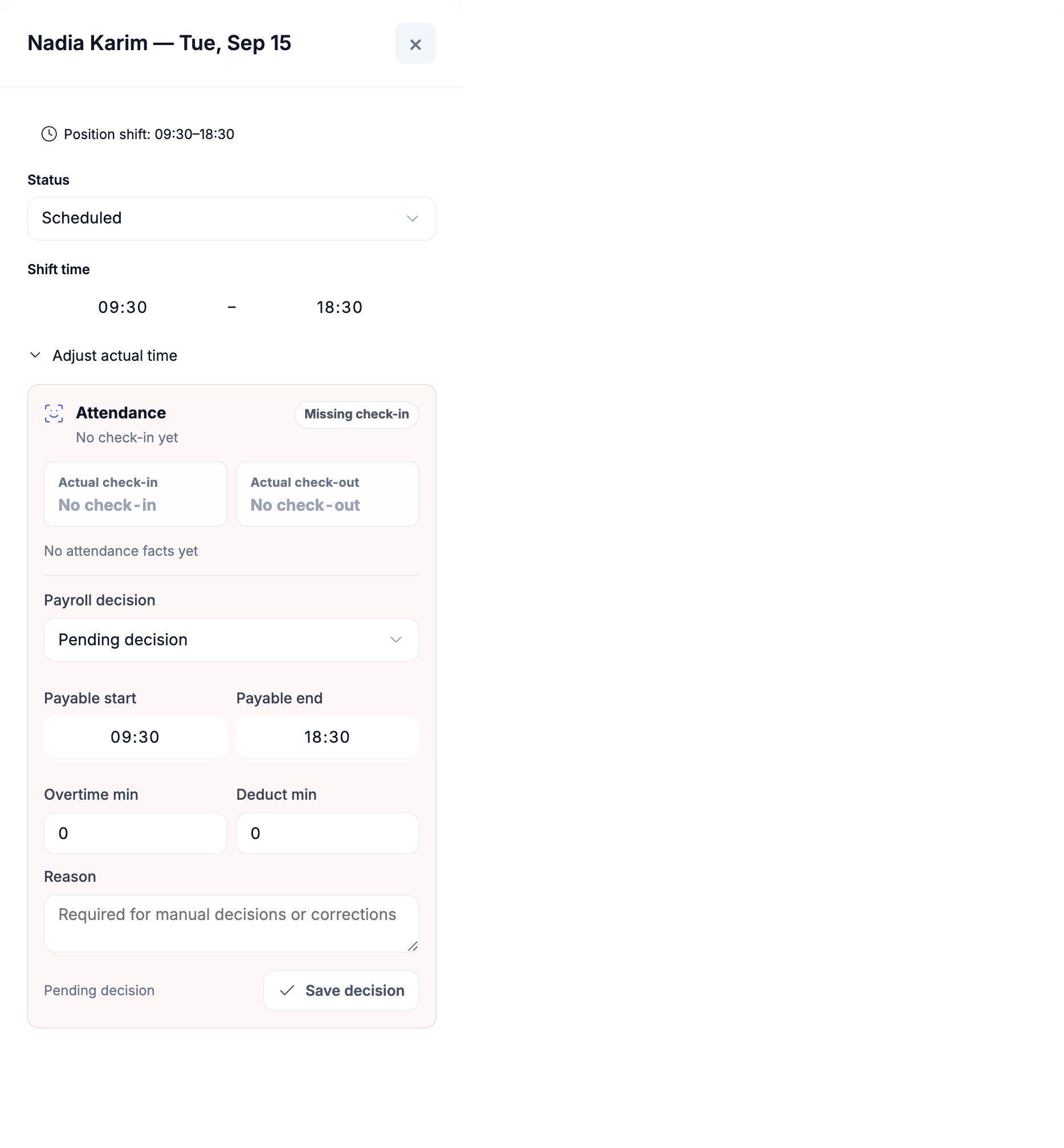
Connect check-in records to planned shifts and approved payable time.

05 / TEAM STANDARDS

Staff performance

Turn service standards into checklists, tests and recurring team tasks.

06 / REVIEW PAY

Payroll

Review pay, prepare WPS salary files and manage final settlements.

Explore all features

01 / EMPLOYEE RECORDS

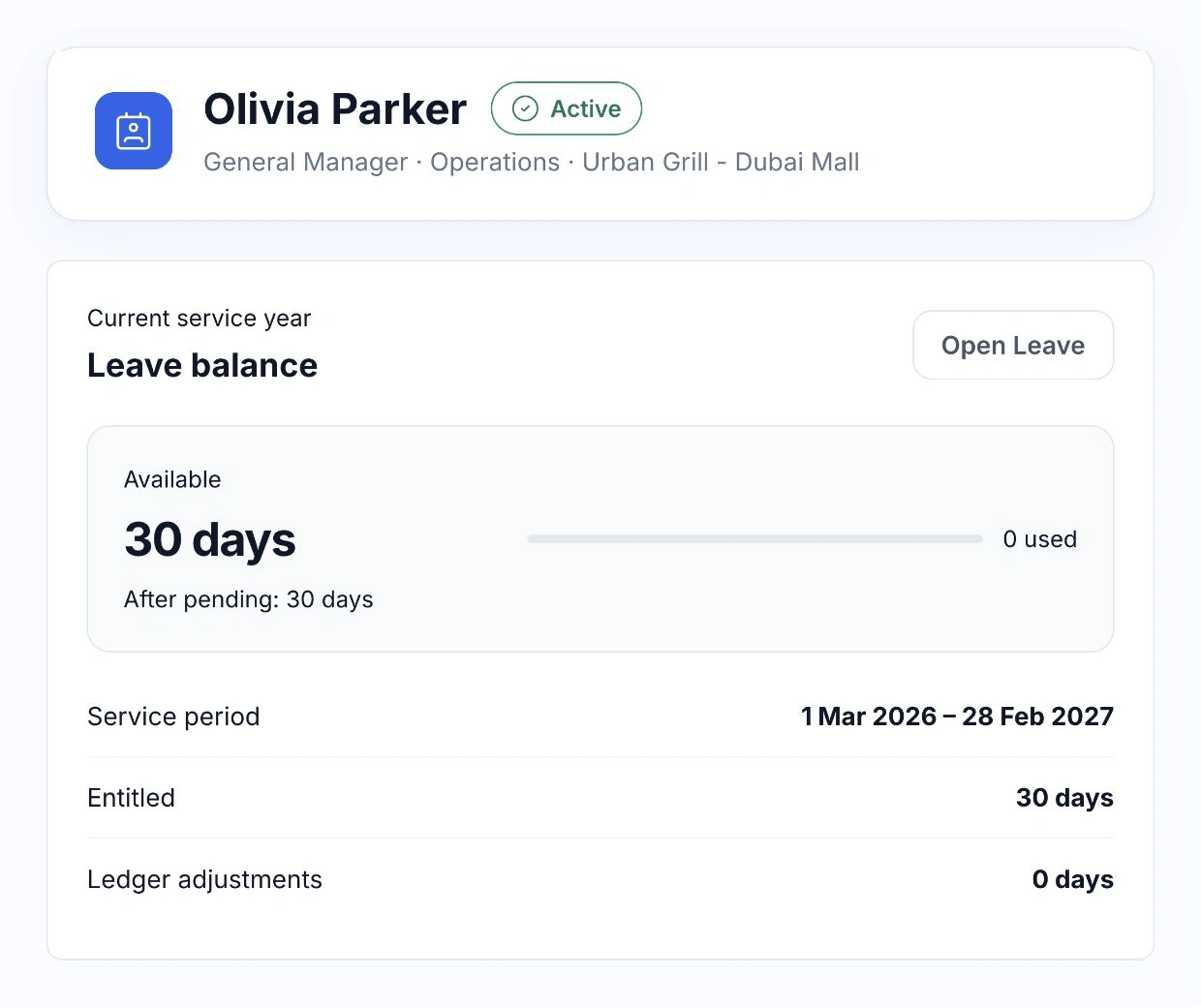
See the employee’s role, schedule and leave in one place.

Open a staff profile to find their position, branch and current employment details. Planned shifts, attendance and leave balances stay connected to the same person.

Managers work within their team’s access. Payroll and staff documents have their own permissions, so sensitive information is available to the people responsible for it.

  • Employee and branch details
  • Schedule and attendance overview
  • Leave balance and requests
  • Role-based access
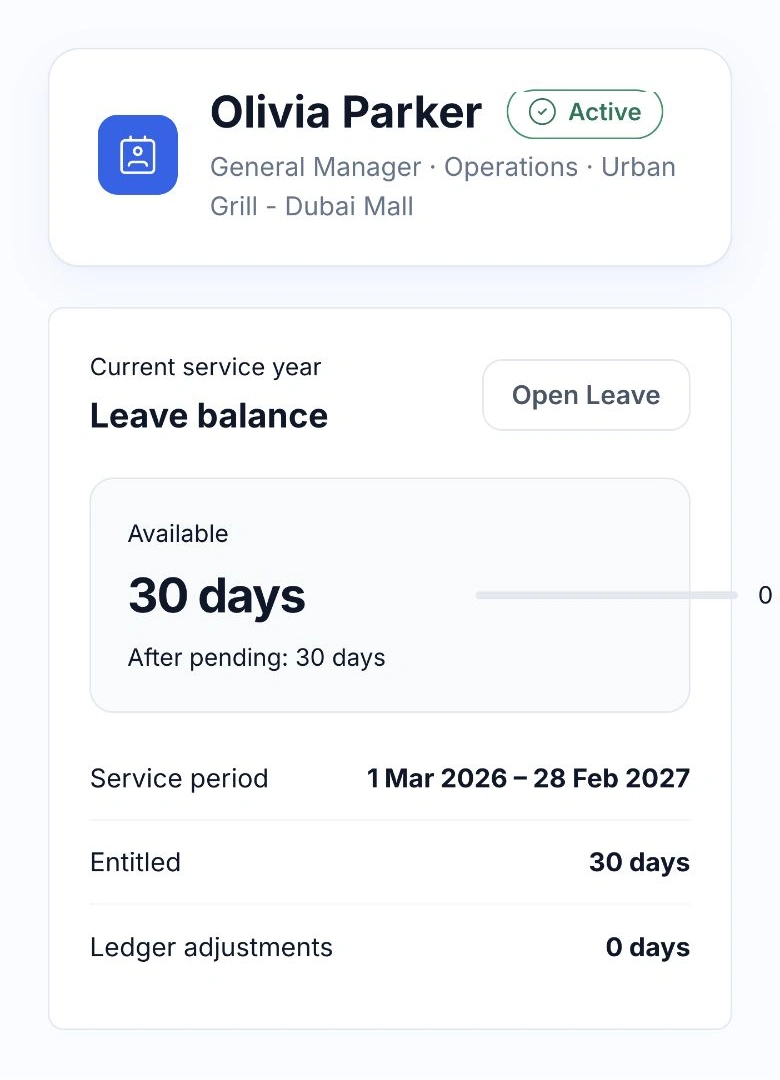
HoreX employee profile with role, branch, available leave and service period

02 / DOCUMENTS & RENEWALS

Keep the paperwork and its dates with the person.

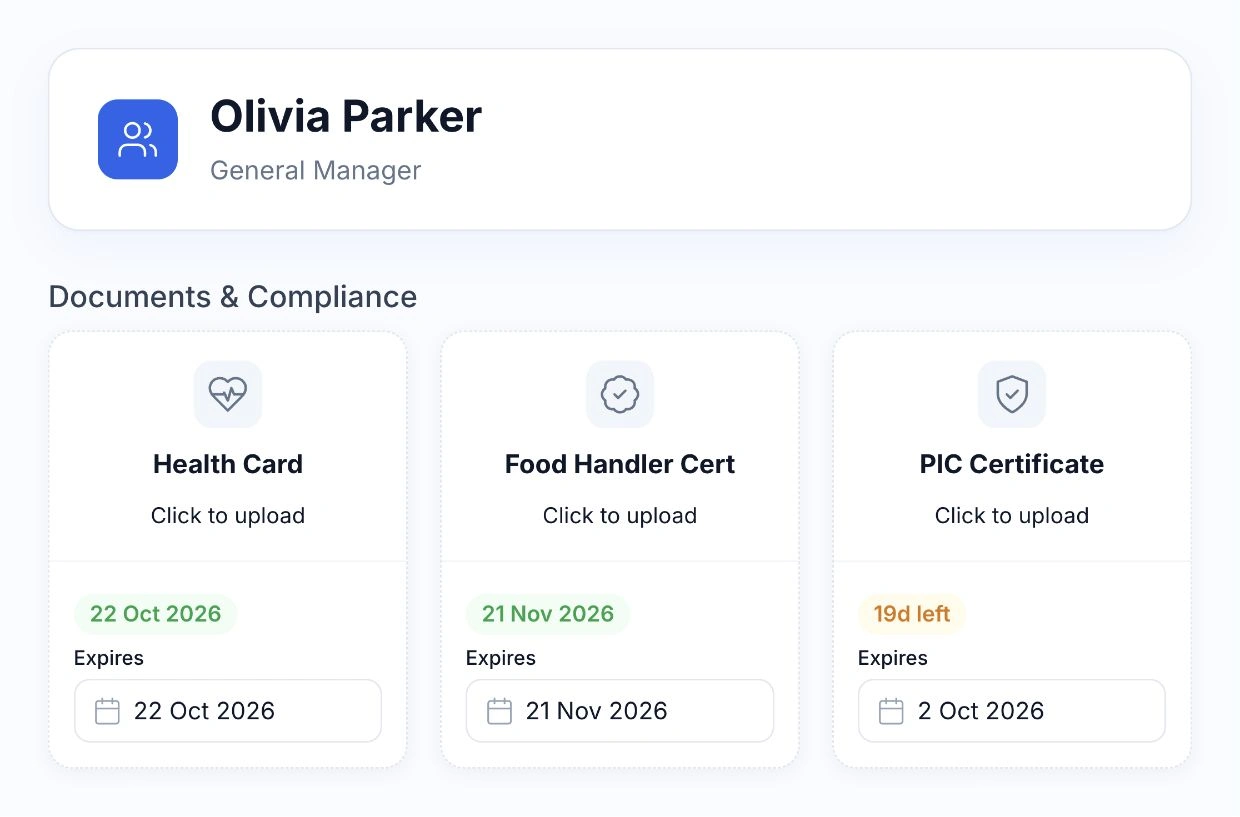
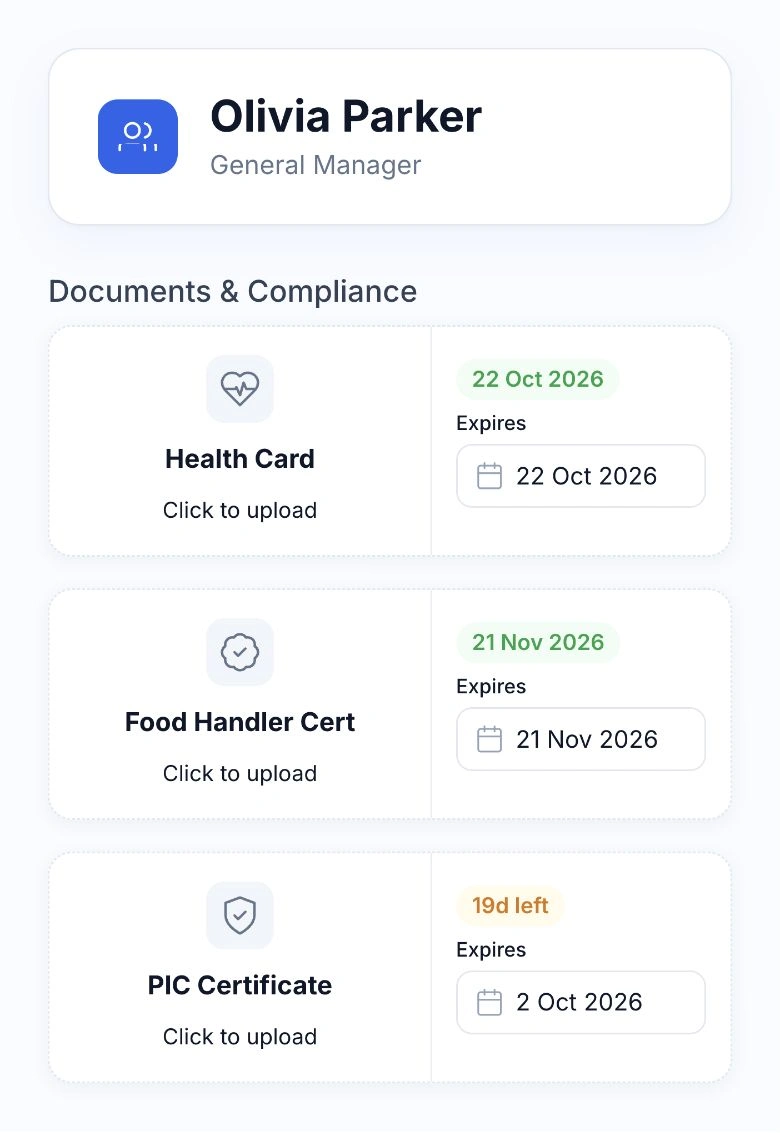
Store identity documents, employment records and the certificates your team needs. Check the recorded expiry dates when planning renewals.

AI extraction can help enter supported document details. Review what it read against the document before saving, and keep access to staff files with authorised users.

  • Document types and attachments
  • Expiry dates
  • AI-assisted data entry
  • Review before saving
HoreX employee certificate records with expiry dates for Health Card, Food Handler and PIC certificates

OFFERS, WARNINGS & CONTRACTS

Prepare the letter. Keep its history with the employee.

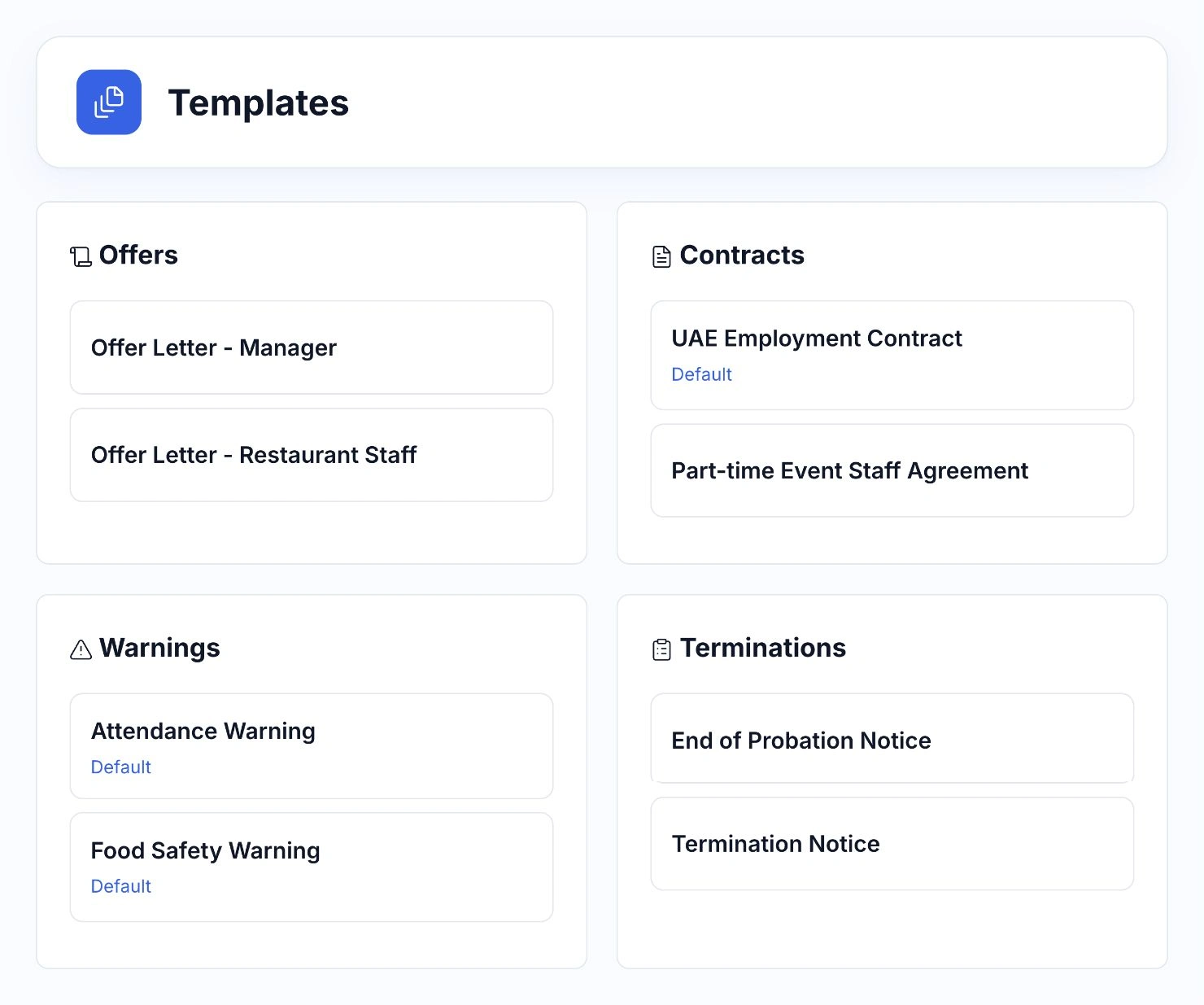
Use ready-made templates for employment offers, contracts, warnings and termination notices. Adapt the wording to your company, choose the relevant template and prepare the document from the employee profile.

Keep the reason, supporting paperwork and document history together. Managers can see what was issued, when it was sent and whether it has been acknowledged, with access limited to the people responsible for HR.

  • Editable HR templates
  • Employment offers and contracts
  • Warnings and supporting records
  • Document delivery and acknowledgement
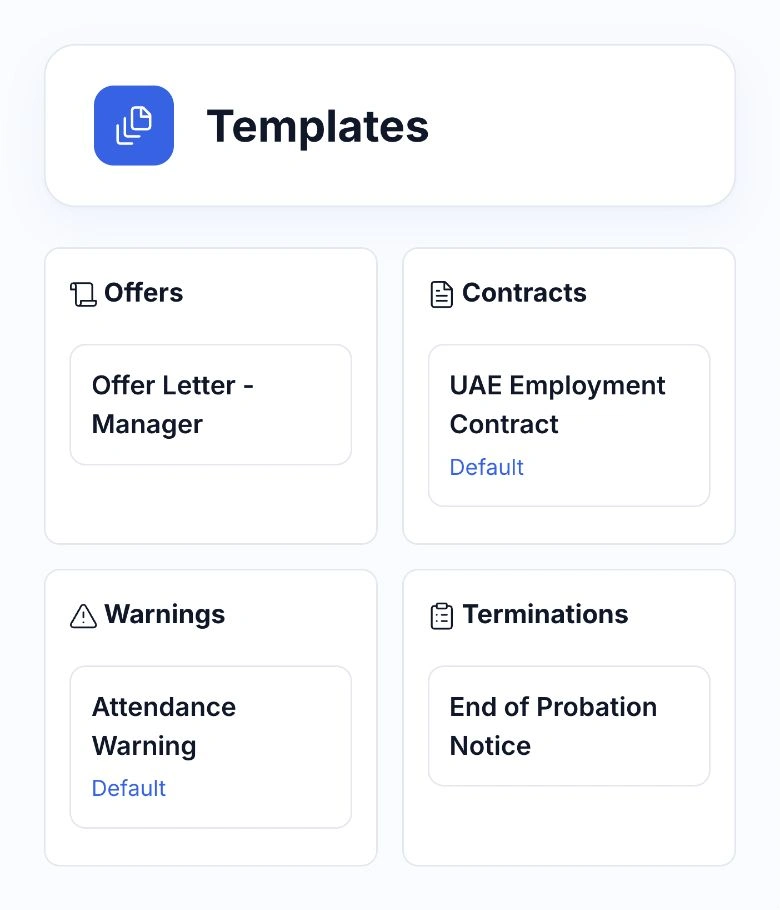
HoreX HR templates for offers, employment contracts, attendance warnings and termination notices

03 / SHIFTS & LEAVE

Plan a month, then handle the changes.

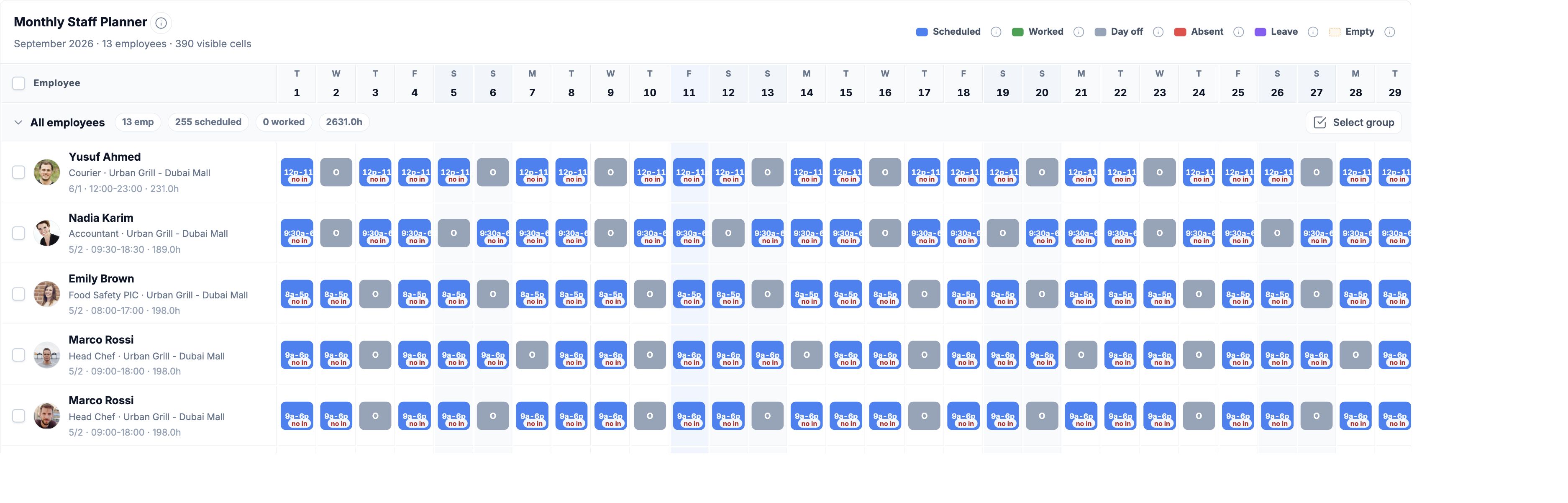
Use the monthly planner to set shifts and days off by employee, role or branch. Start from a work pattern, then adjust the shifts that need a different time.

First two weeks of the actual HoreX monthly planner, with three employee rows and shift or day-off states
Actual HoreX shift details for Nadia Karim, scheduled from 09:30 to 18:30

Approved leave and attendance decisions connect to the staff record. Review exceptions before payroll is submitted, when the period’s schedule becomes protected from later changes.

  • Monthly shift grid
  • Employee and position patterns
  • Leave and day-off states
  • Bulk changes and history

EMPLOYEE SELF-SERVICE

Leave requests, from the employee’s account to approval.

Employees choose their leave dates and send a request from their own account. The manager receives a notification and can review the request, available balance and planned absences before approving or declining.

Request · Approval · Payroll

Send the dates to the manager.

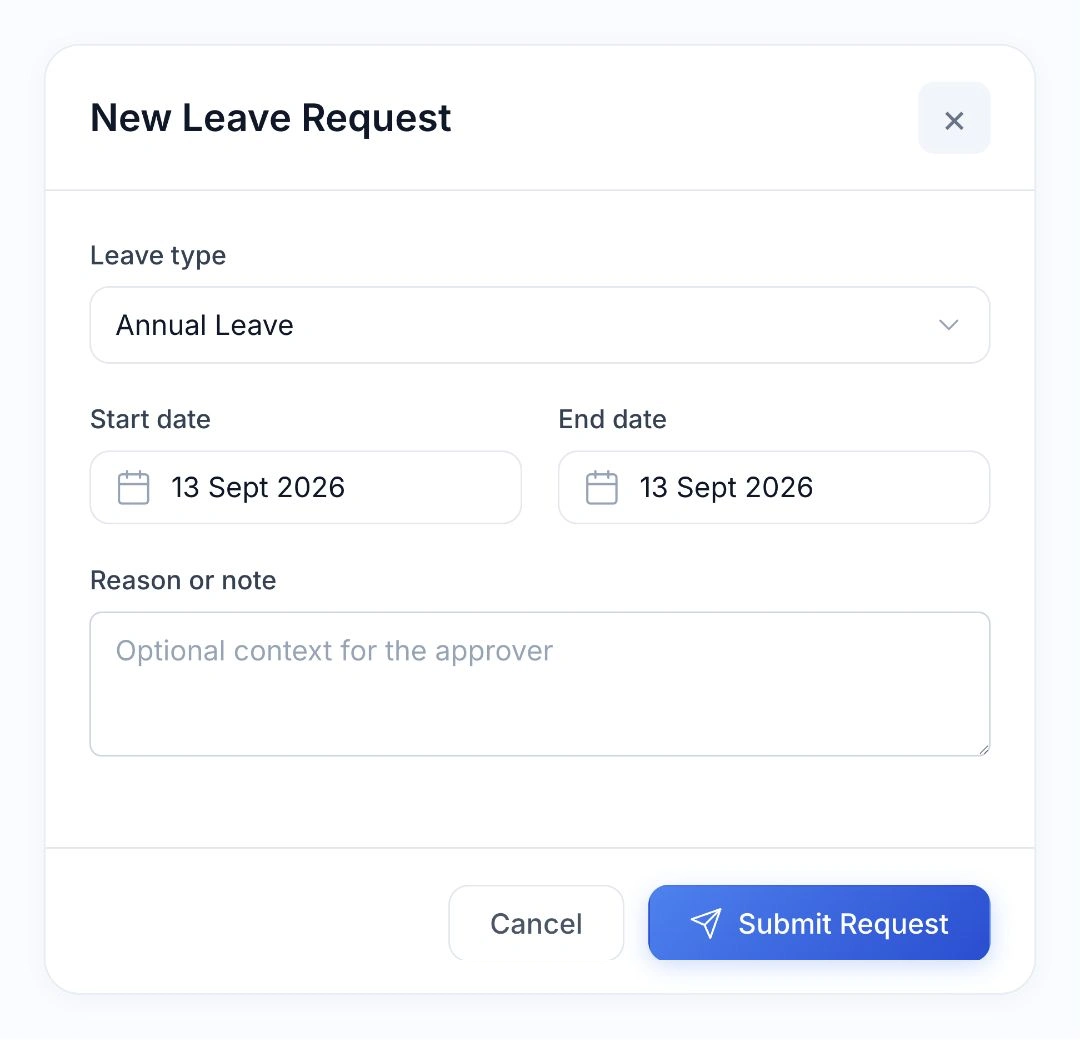
Choose the leave type, start and end dates, and add a note. The request stays pending until a manager reviews it.

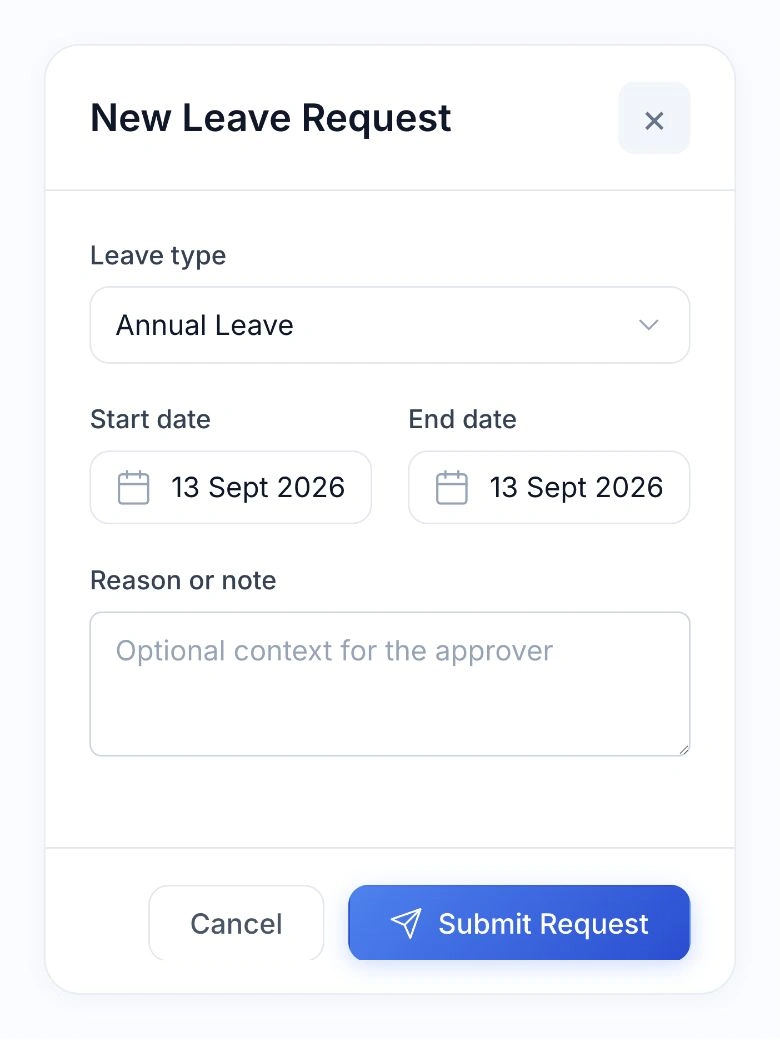
Native HoreX leave request form with leave type, start date, end date and a note

Keep the approved days and pay treatment together.

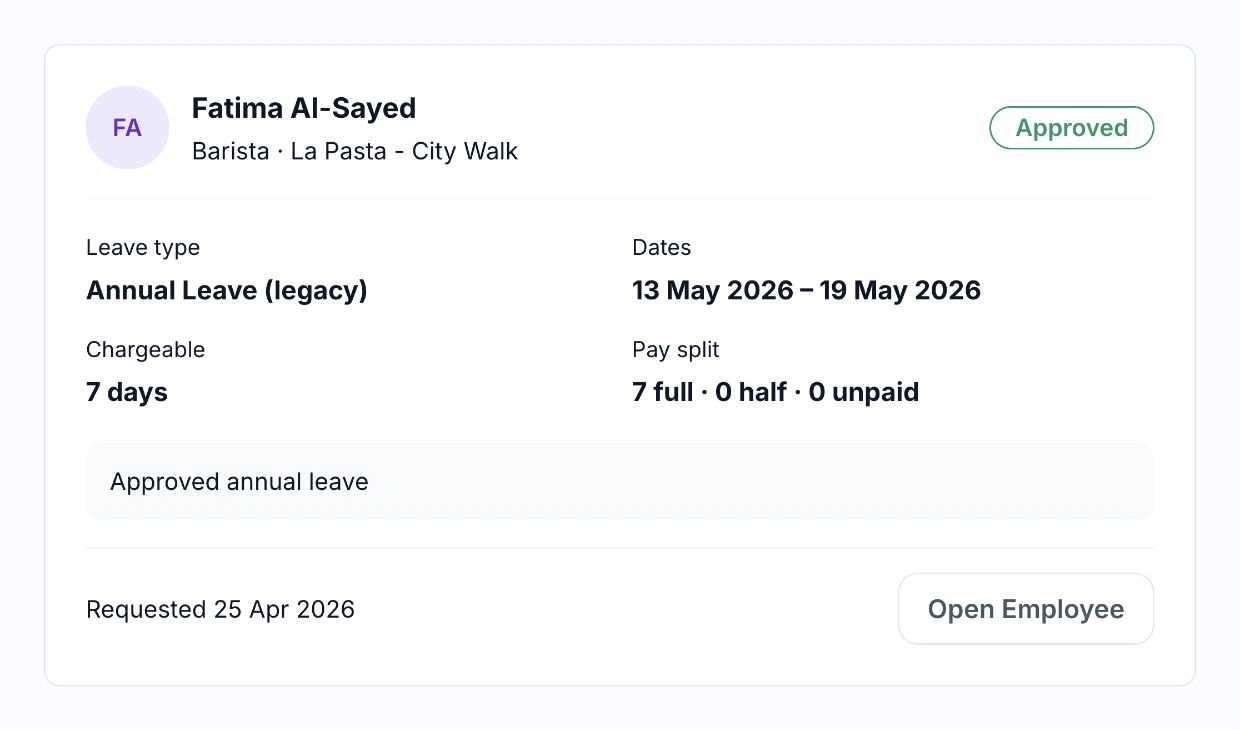
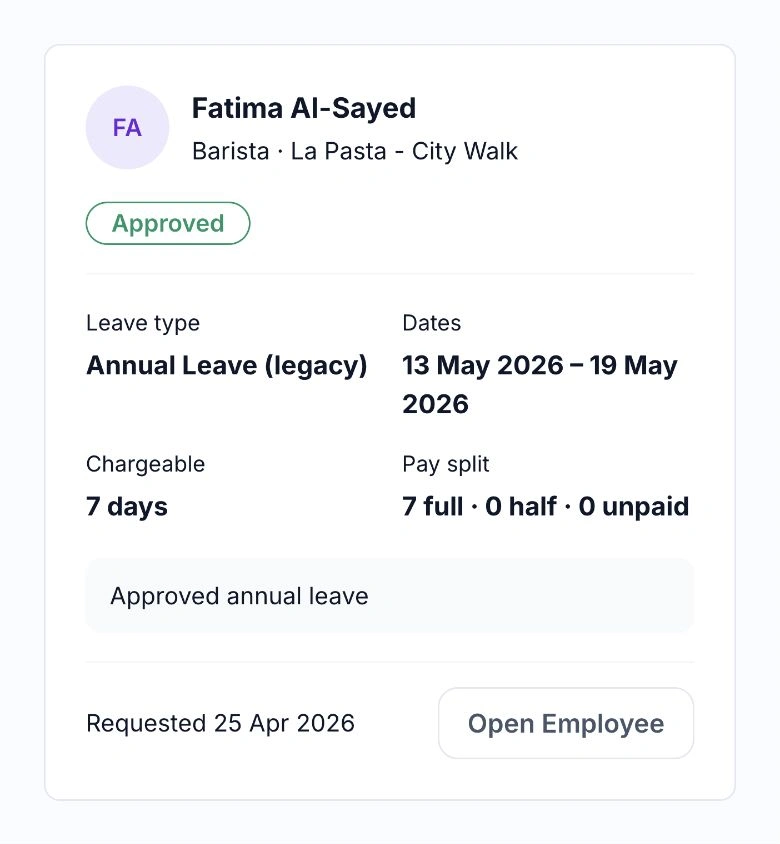
The approved record keeps the employee, dates, chargeable days and pay split together. Managers can return to the employee’s record from the same view.

Approved leave for Fatima Al-Sayed showing dates, seven chargeable days and the full, half and unpaid split

Once approved, the leave updates the employee’s balance and schedule. Its full-pay, half-pay or unpaid treatment carries into payroll, so the team does not have to enter the same absence again.

  • Requests from the employee’s account
  • Manager notification and approval
  • Automatic balance and schedule updates
  • Leave pay included in payroll

04 / TIME & ATTENDANCE

Know who worked, where and for how long.

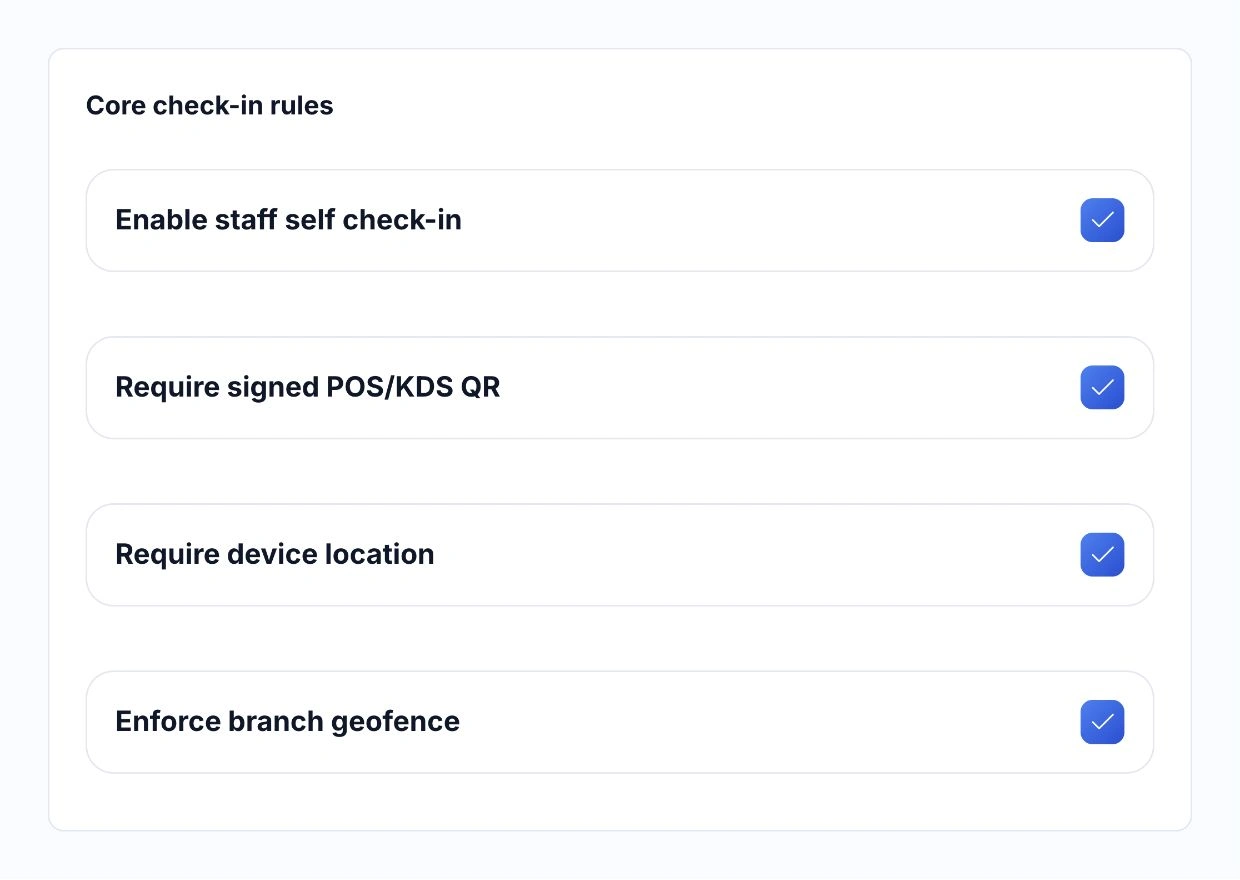
Staff can clock in and out from their phone. Set the check-in rules for your restaurant: scan the QR on a branch’s POS or KDS, record the phone’s location and check that the employee is at the right workplace.

Managers compare clock records with the planned shift, then review missing marks, payable hours, overtime and deductions. Payroll uses the approved decision, so an early arrival does not become overtime without review.

  • Staff check-in and check-out
  • POS or KDS QR
  • Location and branch checks
  • Manager-approved payable time
HoreX Attendance check-in rules for staff self check-in, POS/KDS QR, phone location and branch geofence

05 / STAFF PERFORMANCE

Make service standards part of the weekly routine.

Build checklists, tests and inspections around the way your restaurant works. Cover guest greetings, allergy questions, menu knowledge, payment handling and the checks each role needs.

Checklists · Tests · Inspections

Define what good service looks like.

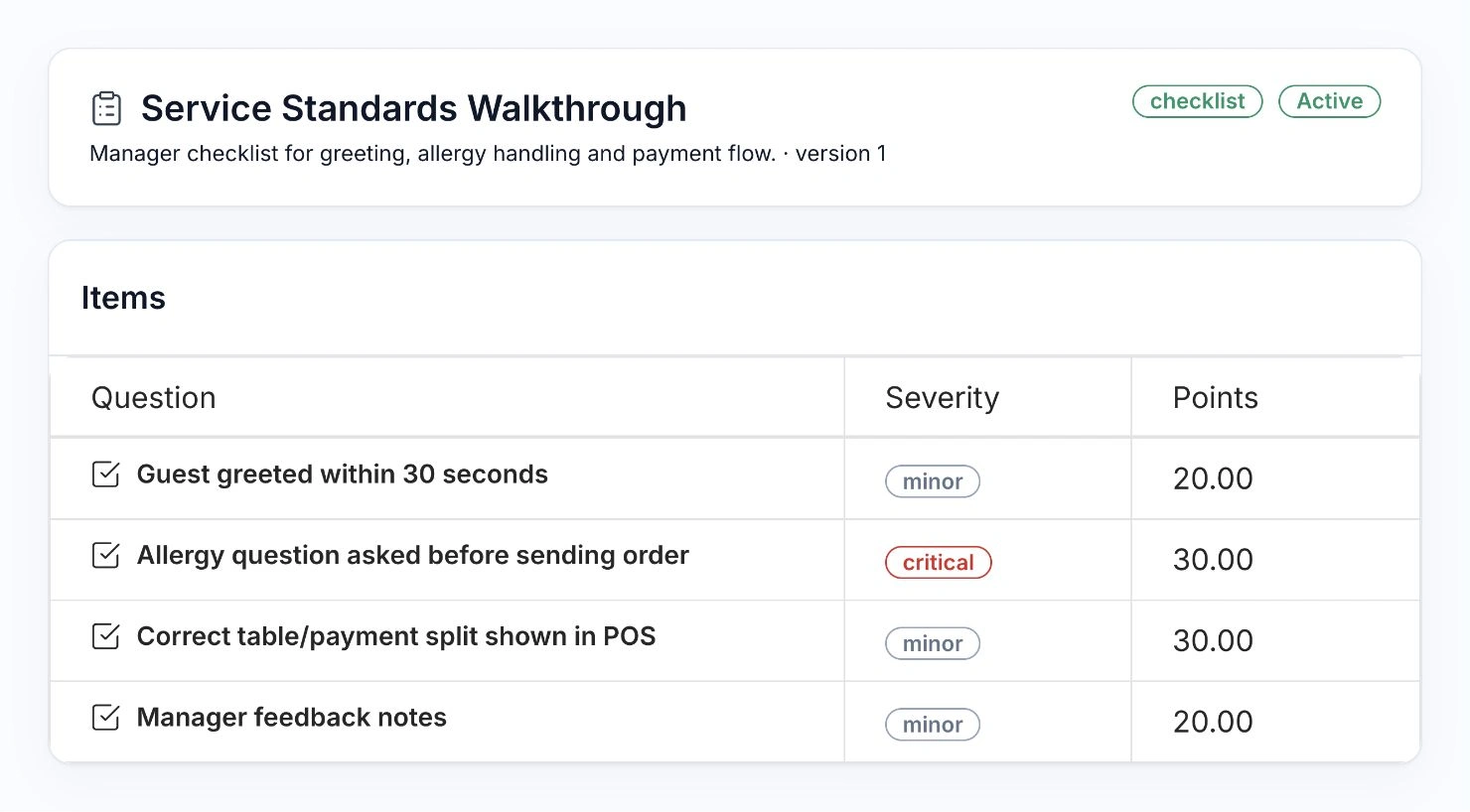
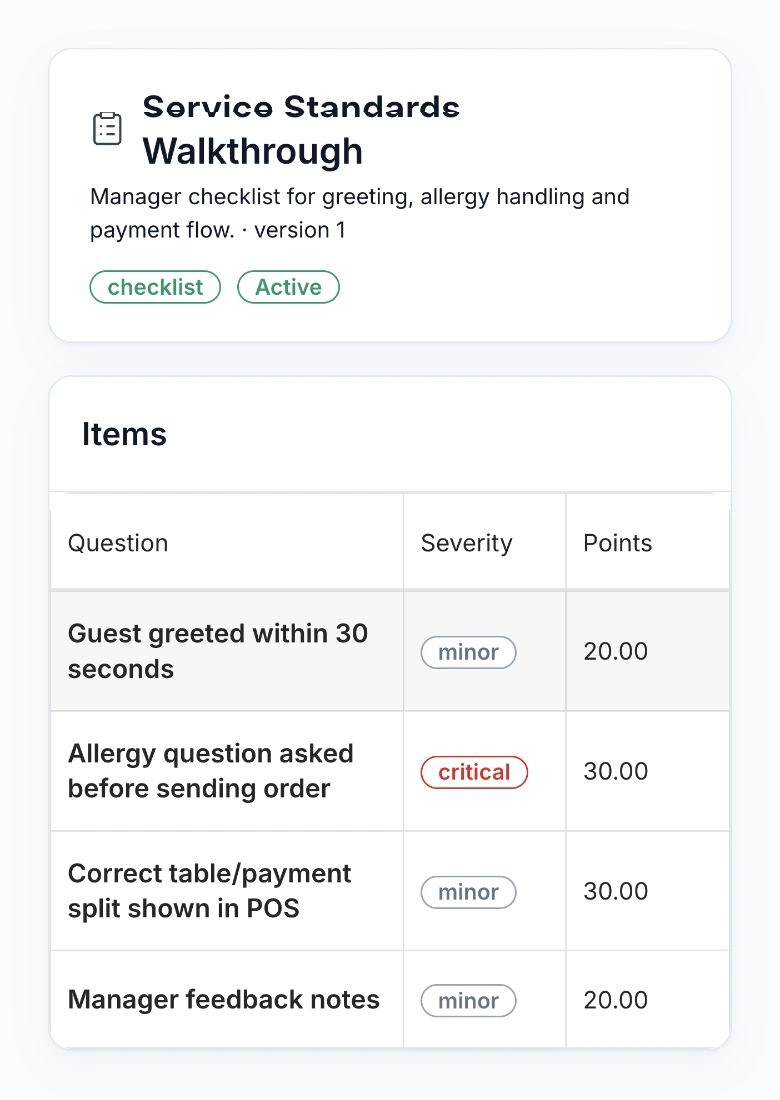
Keep the questions, importance and points in one template. A manager can check the same standards across the team and leave notes on what needs attention.

HoreX service checklist with guest greeting, allergy question, POS payment handling and manager feedback

Give each role a clear routine.

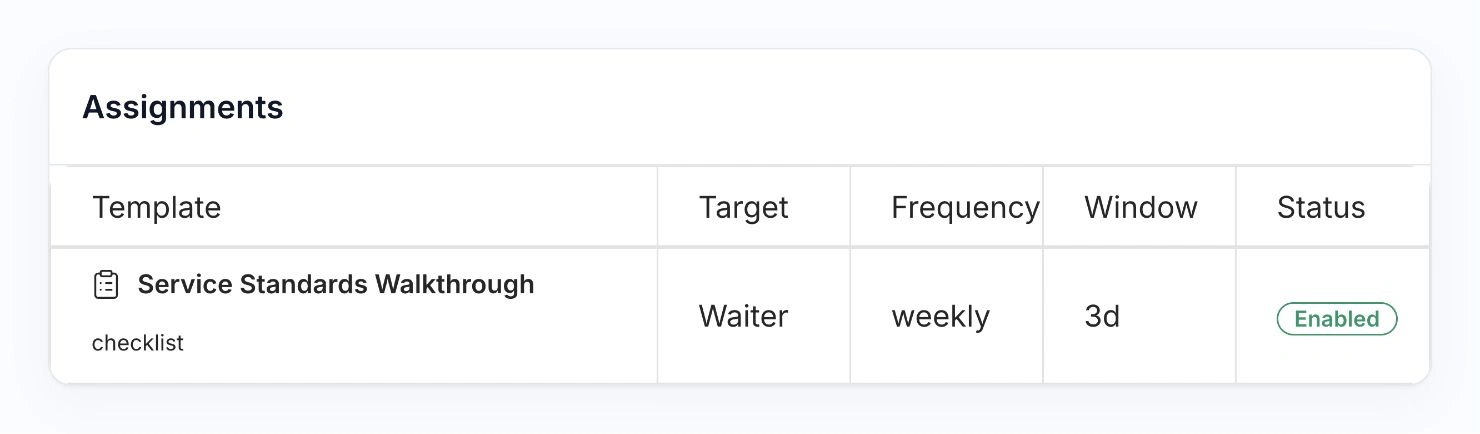
Set a recurring assignment for a position or a specific employee. The service checklist here is assigned to waiters every week, with a three-day window to complete it.

HoreX weekly service checklist assignment for the Waiter position, with a three-day window and enabled status

Assign a template to an employee or position, set a deadline and make it repeat. Managers can follow pending, completed and overdue tasks, review scores and use the answers to guide training.

  • Custom questions and scoring
  • Employee or role assignments
  • Recurring checks and deadlines
  • Completion and results review

TEAM DEVELOPMENT

Give feedback the team can act on.

Use the submitted answers and manager notes to prepare the next team briefing. Discuss the step that needs practice, explain the expected standard and follow up in the next check.

New team members get a clear reference. Experienced staff and managers share the same checklist, so expectations stay consistent across shifts and branches.

  • Answers and manager notes
  • Role-specific checks
  • Recurring follow-up
  • Shared service standards
A restaurant manager, floor supervisor and chef discuss service standards around a tablet
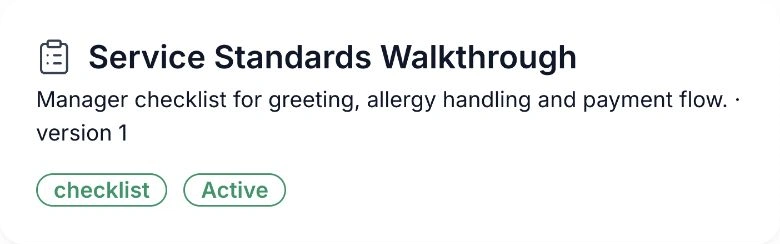
HoreX Service Standards Walkthrough checklist for greeting, allergy handling and payment flow

06 / PAYROLL

Review the month before the salary file goes out.

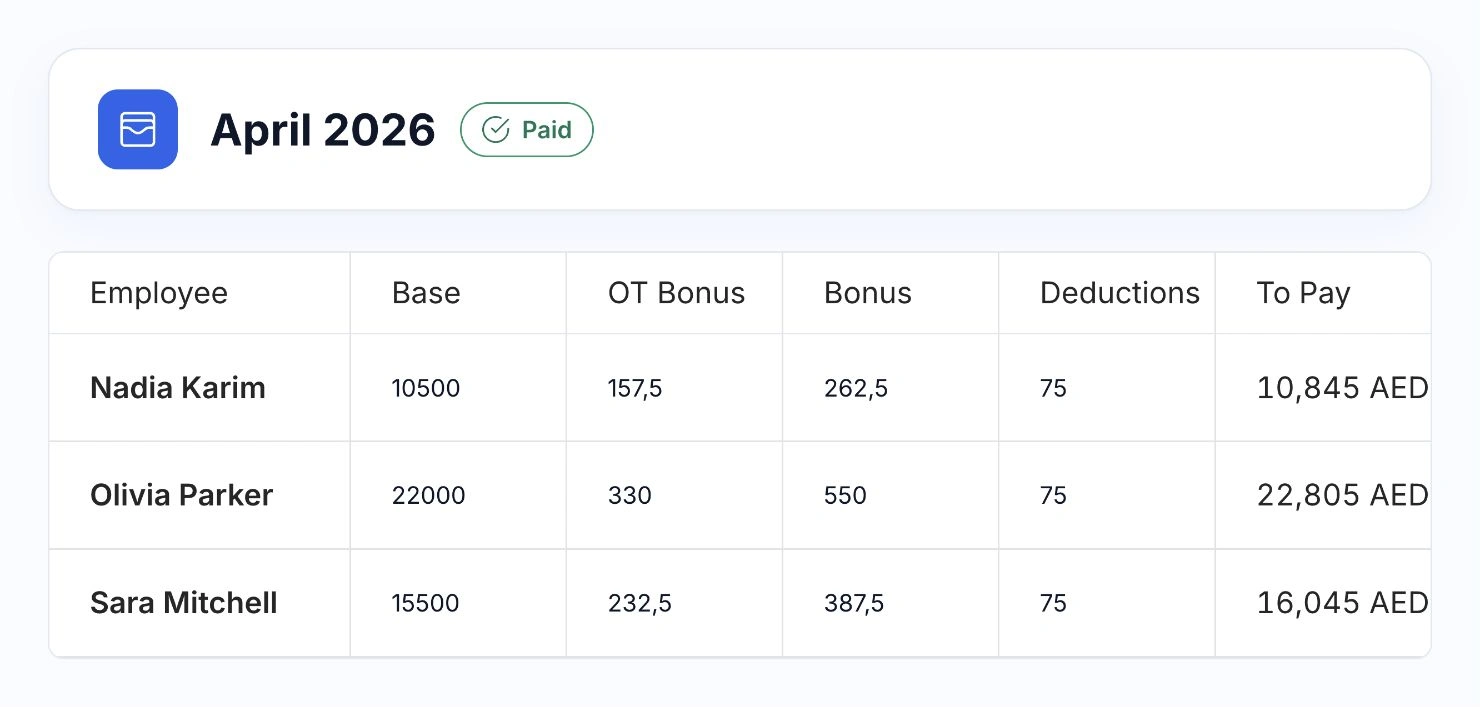
Bring the salary basis, approved payable time, overtime and adjustments into the payroll draft. Check the amounts and paying-company details before submitting the period for payment.

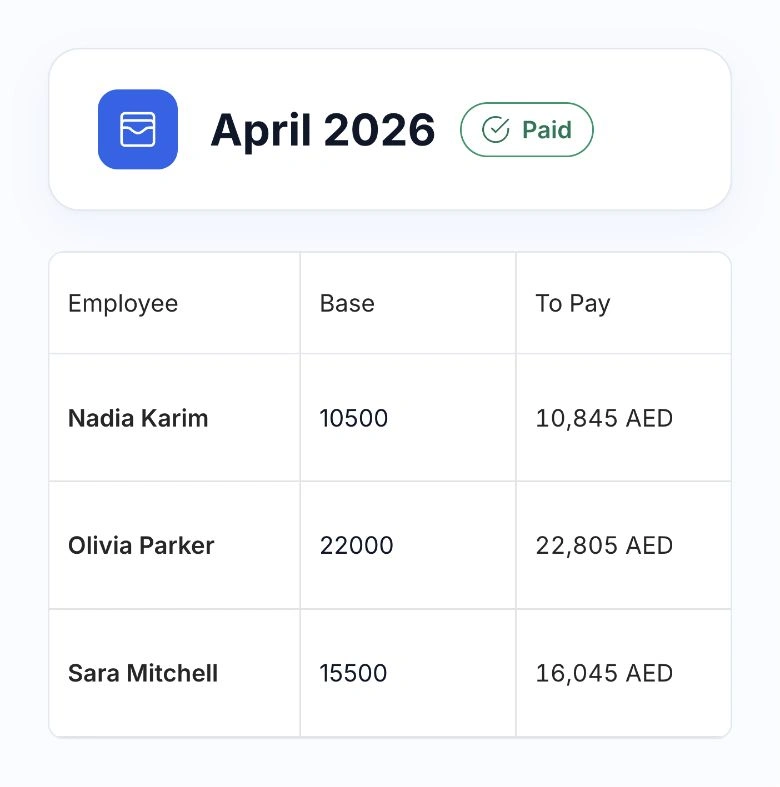
HoreX monthly payroll showing base salary, overtime bonus, bonus, deductions and net payable amounts for three sample employees
HoreX payroll showing each employee, salary basis and payable amount together

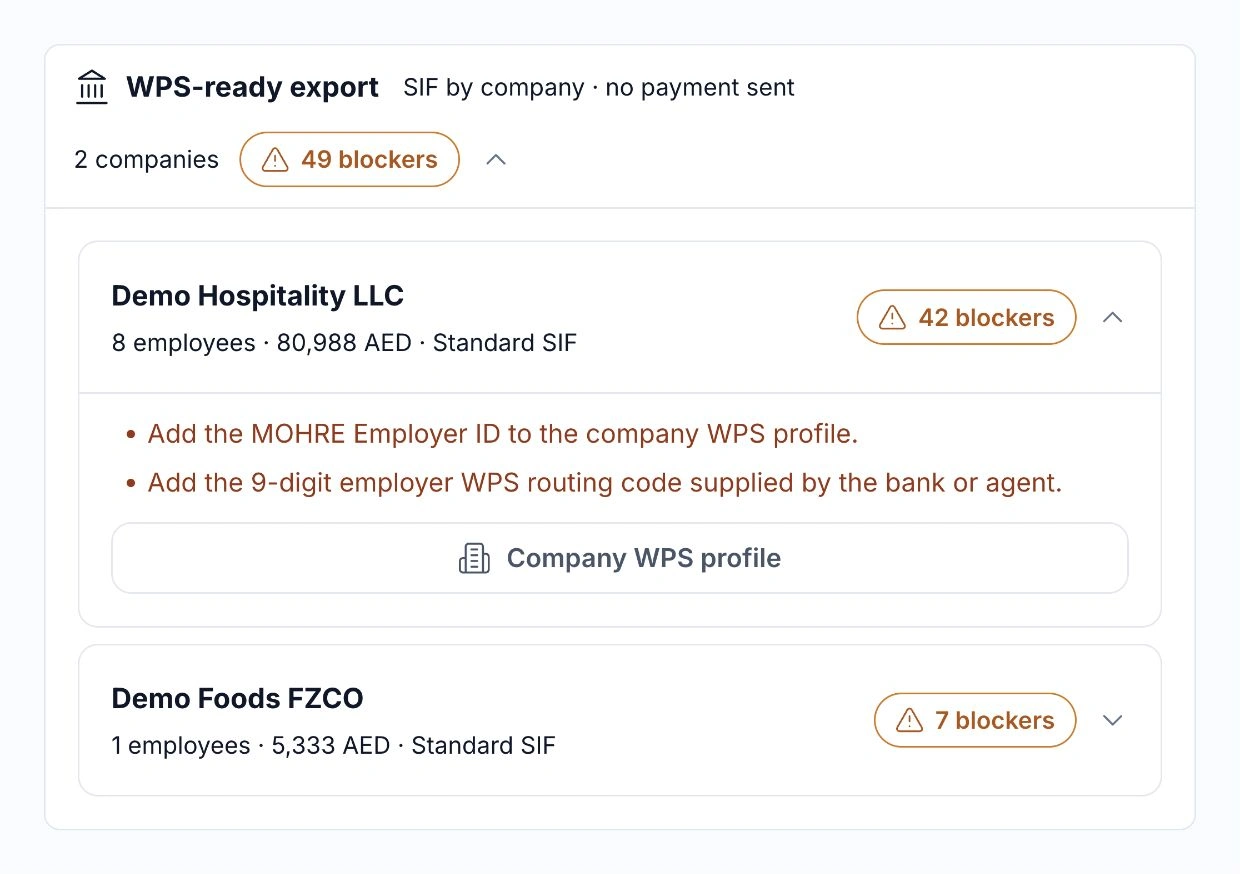
The WPS readiness check helps identify missing payment details before a SIF export. Record the payroll as paid after the actual payment has been made.

  • Monthly payroll draft
  • Approved time and adjustments
  • WPS readiness and SIF export
  • Payment status and history

UAE PAYROLL · WPS & MOL / MOHRE

WPS payroll with MOL / MOHRE records.

Keep MOL / MOHRE employer and person IDs, bank or agent routing details, and employee salary-account records connected to payroll. HoreX checks the required details and payroll amounts before export, so the team knows what needs attention.

Prepare a separate SIF salary file for each paying legal entity and keep its export history. Your authorised team submits the file through the bank or WPS agent, then records the completed payment in HoreX.

  • Company and employee MOHRE records
  • Bank and payroll-card details
  • Checks before SIF export
  • Separate files and history by company
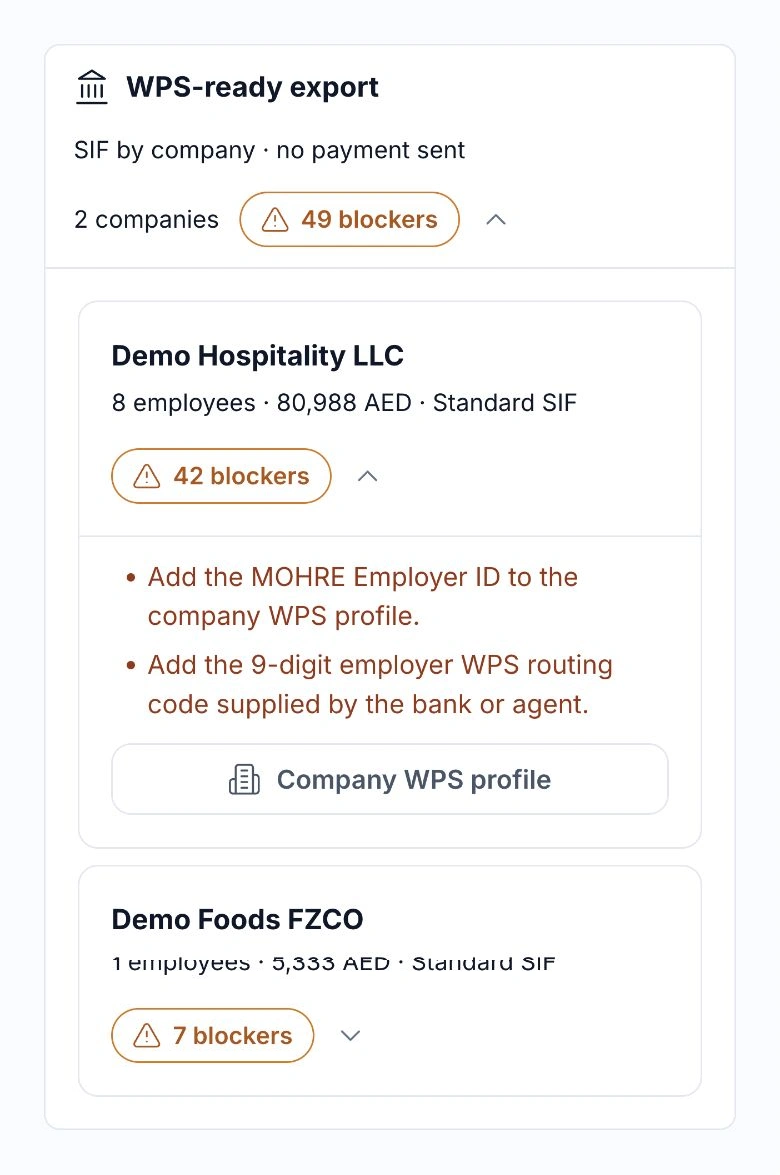
HoreX WPS preflight showing company salary totals and missing employer ID and routing details

GRATUITY & FINAL SETTLEMENT

Gratuity and final settlement in one employee record.

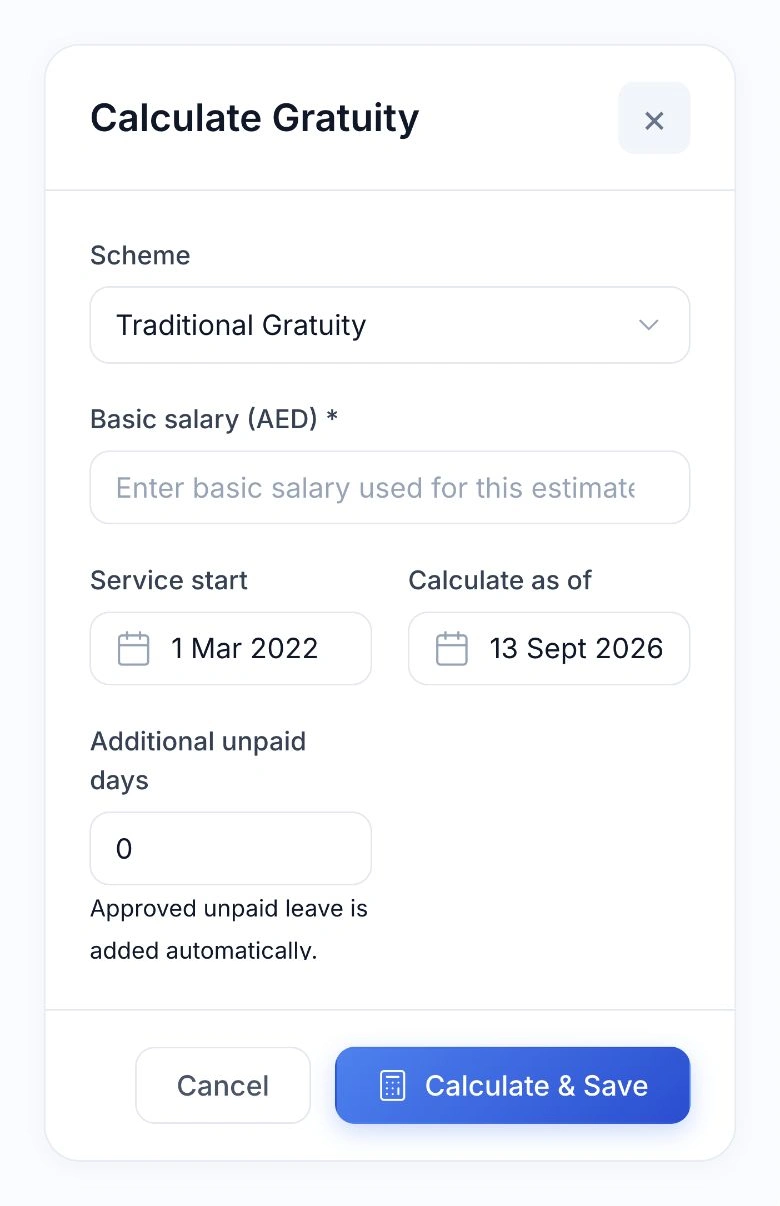
Prepare a gratuity estimate using the employee’s basic salary, service dates and applicable scheme. Approved unpaid leave is included in the calculation, and the saved estimate retains its inputs and result for later review.

Estimate · Settlement · Confirmation

Keep the basis of the calculation clear.

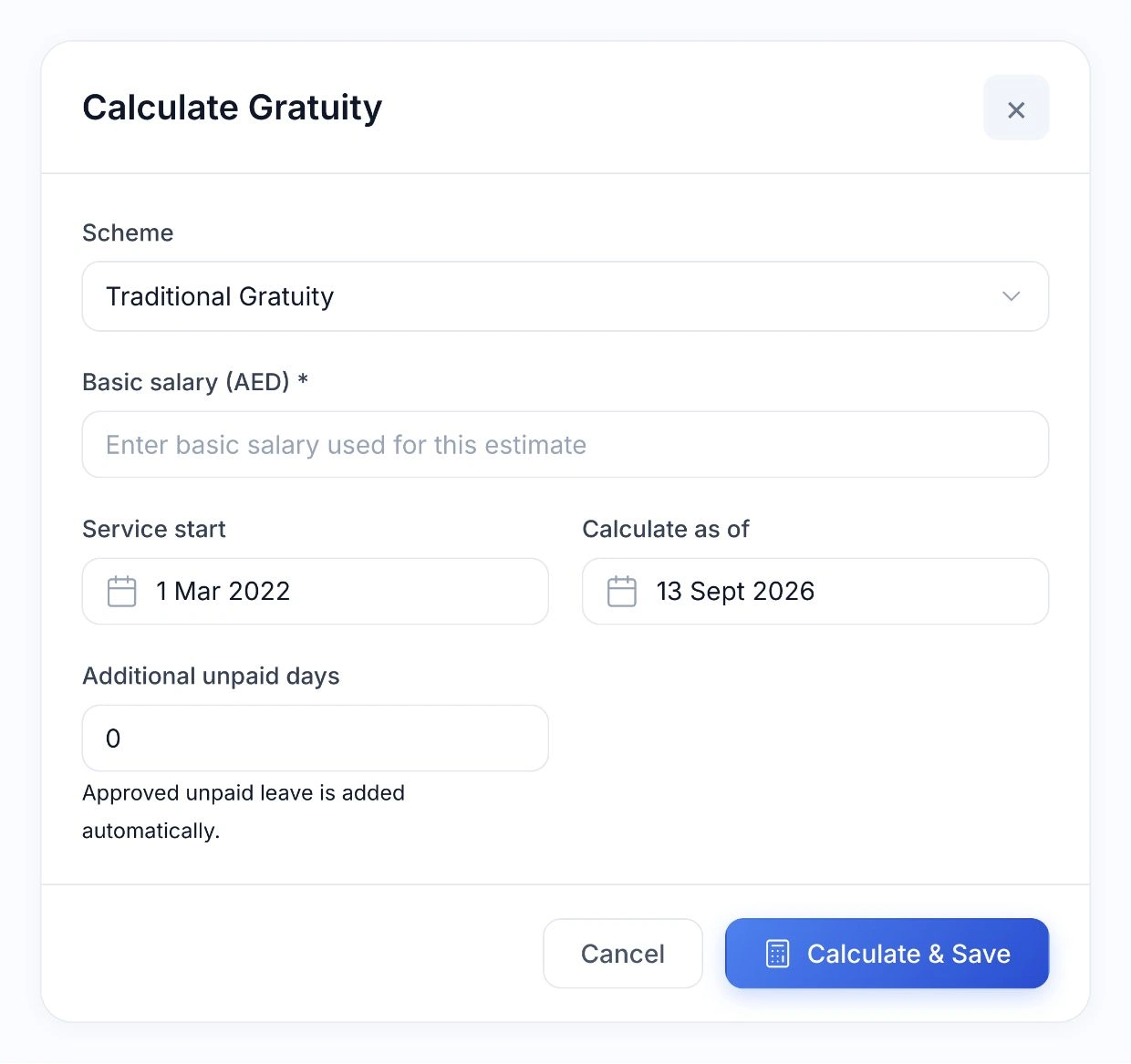
Enter the actual basic salary and check the service dates. HoreX includes approved unpaid leave and saves the estimate with its calculation basis.

HoreX gratuity form with scheme, basic salary, service dates and automatic approved unpaid leave

Review the complete amount before closing the case.

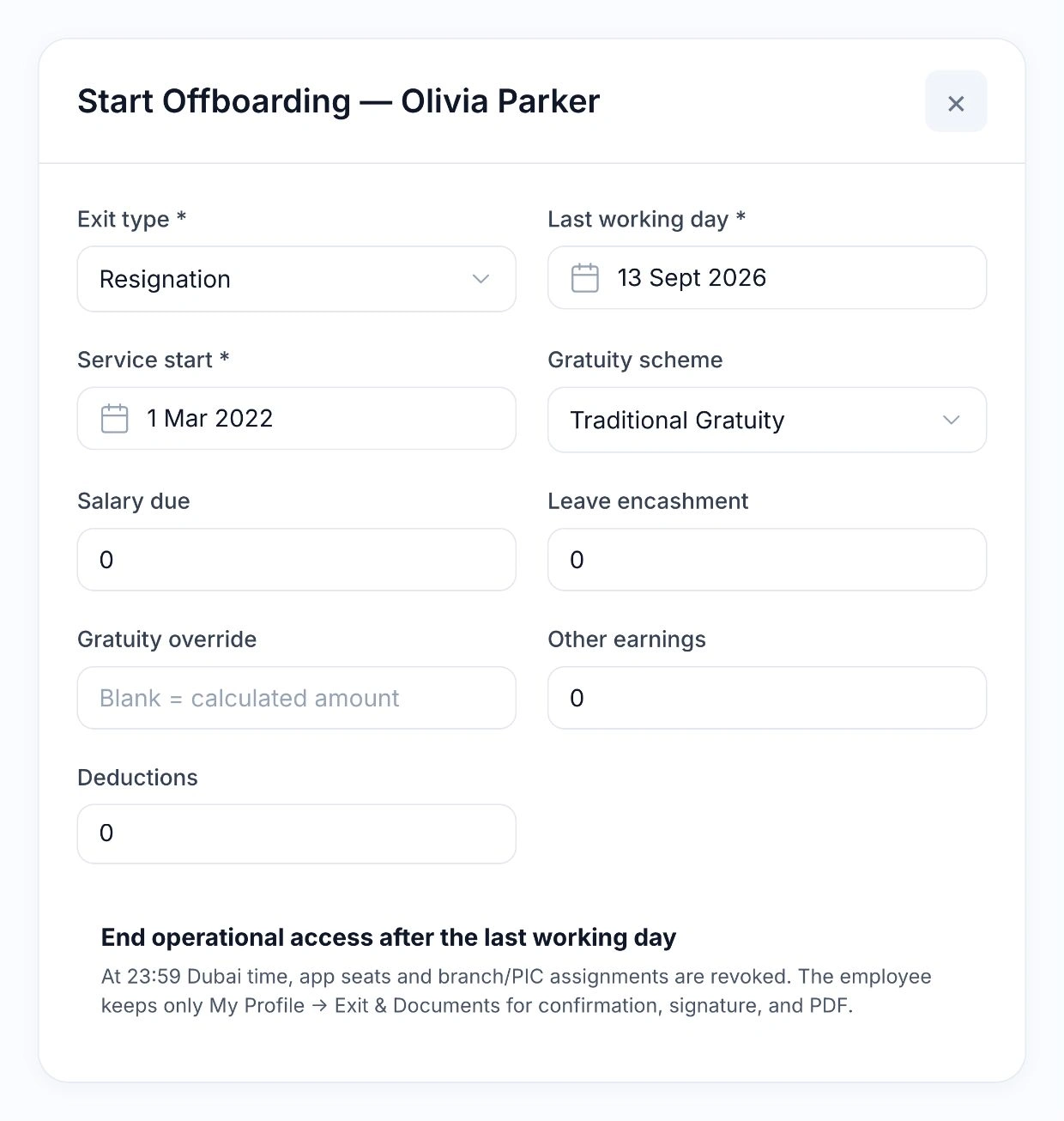
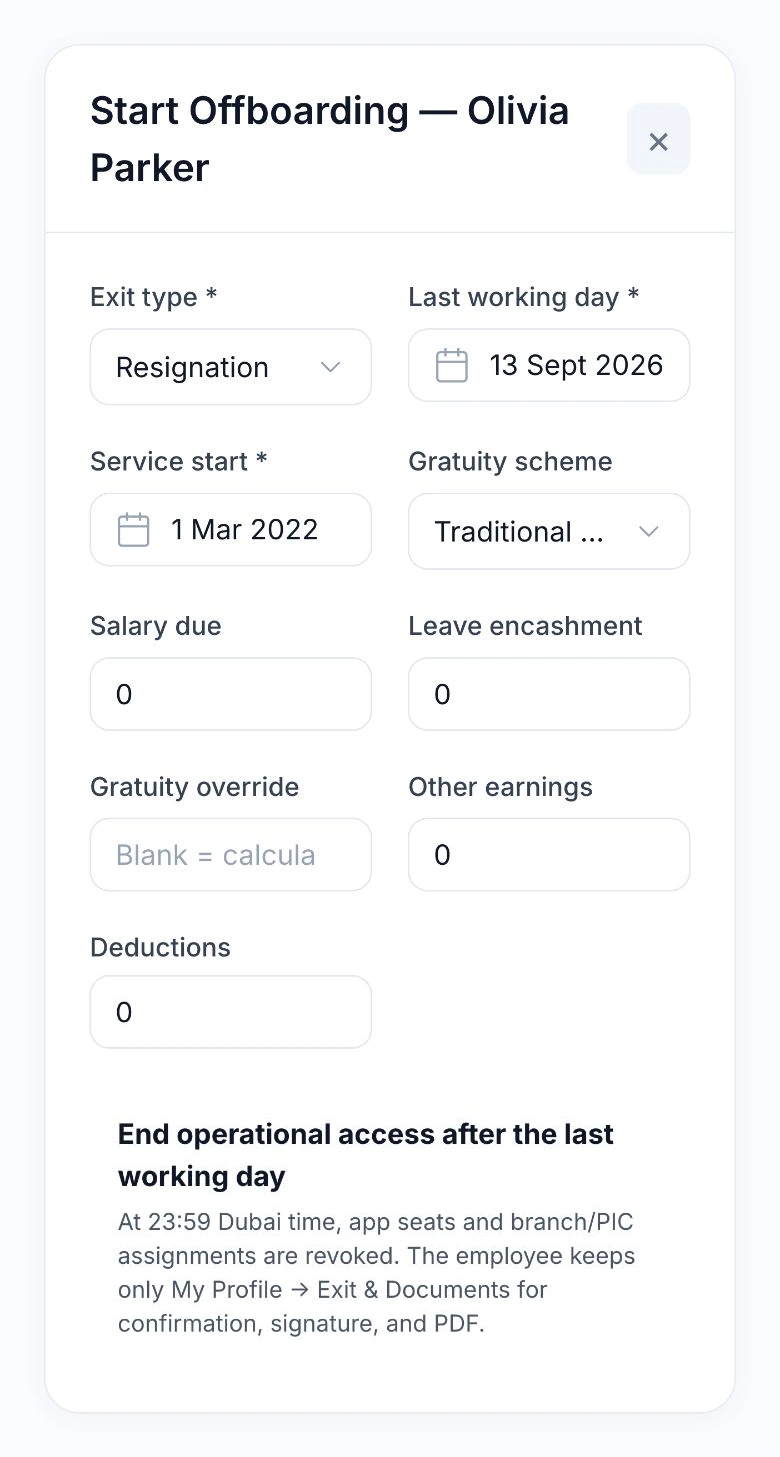
Combine the settlement components and keep the employee involved in the review. Payment and the signed record remain separate, traceable steps in the exit process.

Native HoreX offboarding form showing salary due, leave encashment, gratuity, other earnings and deductions

Bring gratuity, salary due, leave encashment, other earnings and deductions into one final settlement. Keep HR review, the employee’s confirmation or correction request, payment evidence and the signed document linked to the same exit case.

  • Gratuity estimates with saved inputs
  • Salary, leave pay and deductions
  • Employee review and confirmation
  • Payment evidence and signed settlement

More in HR & payroll.

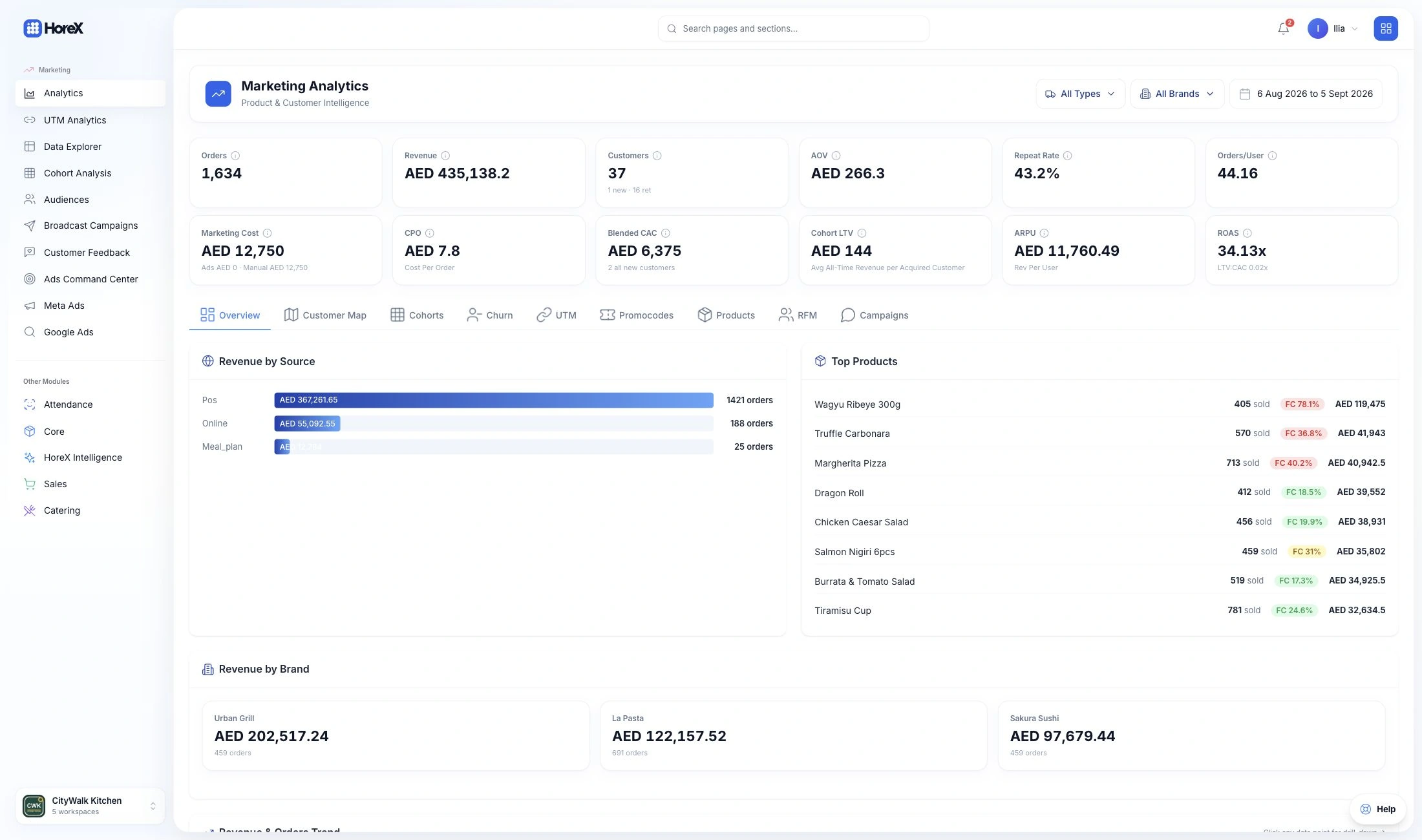
Employee records, HR documents, leave, attendance, service standards and the decisions behind each payroll month.

Employee profiles

Keep one working record for each person.

See details

The employee profile brings the person’s role, branch, employment details, salary basis and account connection together. Schedule, attendance and payroll use this record. Deactivation preserves history; review account access separately when someone leaves.

  • Role and branch
  • Employment details
  • Salary basis
  • Connected work history

Staff documents

Keep staff paperwork with the employee.

See details

Store the supported identity, employment and certification documents in the profile. The record keeps document types and dates available for review instead of spreading them across messages and folders. Access follows the employee-document permissions.

  • Identity and employment documents
  • Certificate records
  • Recorded expiry dates
  • Permission-based access

Document expiry review

Check the renewal dates before they become urgent.

See details

AI extraction can read supported document details and expiry dates from an upload. Review the extracted fields against the source document, correct them where needed, then save the record. Clear scans help the review; extraction is not a substitute for checking.

  • Supported document extraction
  • Expiry-date fields
  • Source-document review
  • Corrections before saving

Monthly payroll

Review pay with the attendance decisions behind it.

See details

Payroll brings the configured salary basis together with approved payable time, overtime, adjustments and the month’s records. Review the draft before submitting it for payment. Pending and paid periods protect the associated schedule from later changes.

  • Salary and payable time
  • Overtime and adjustments
  • Draft-to-pending review
  • Closed-period protection

Leave management

Review requests alongside the employee’s balance.

See details

Track leave requests, dates, chargeable days and the applicable pay treatment. Managers approve or reject requests within their access. Approved leave appears in the schedule where the period is still open, while the profile keeps the balance and pending days visible.

Employees can request leave from their own account. The responsible manager receives an approval notification. Once approved, chargeable days update the balance and schedule, and the applicable leave-pay treatment carries into payroll.

  • Request and approval queue
  • Available and pending days
  • Full, half or unpaid treatment
  • Schedule connection
  • Employee self-service
  • Manager approval notifications

Monthly staff schedule

Plan who is working and when.

See details

Use the monthly grid to review employees, shift times and days off. Generate a pattern from the configured employee or position settings, then adjust individual or selected cells. Existing shifts are preserved when generating missing entries.

  • Monthly planner
  • Position and employee patterns
  • Bulk shift editing
  • PDF and change history

Warnings and supporting documents

Keep the reason and evidence in the staff record.

See details

Record a warning with its reason and supporting documents where your staff process requires it. Sensitive attachments remain available only to authorised users. Review the event and follow the organisation’s employment process before taking action.

Choose a warning template, record the reason and keep the issued document in the employee’s history. Delivery and acknowledgement are tracked separately from issuing the document.

  • Recorded warning reason
  • Supporting attachments
  • Employee history
  • Restricted document access
  • Issue and delivery history
  • Acknowledgement status

HR document templates

Prepare recurring staff documents consistently.

See details

Keep reusable HR document templates for the employee paperwork your organisation uses. Fill the relevant details and review the document before issuing it. Templates support a consistent process; their wording and use remain a management responsibility.

Templates cover employment offers, contracts, warnings, termination notices and receipts. HR can adapt the company wording and select the appropriate letter from an employee’s profile.

  • Reusable templates
  • Employee context
  • Document preparation
  • Review before issue
  • Employment offer templates
  • Contracts and termination notices

Positions and work patterns

Define the settings used by each role.

See details

Positions hold the role, reporting relationship and default work or pay settings. Employee-specific overrides can apply where needed. Changing a default does not rewrite an existing month’s schedule.

  • Role structure
  • Reporting relationships
  • Default patterns
  • Employee overrides

Branch access

Give managers the team scope they need.

See details

Employee and manager access is limited by the configured branches and reporting hierarchy. Keep the staff member’s workplace assignment and their account access under review; these are related settings with different purposes.

  • Workplace assignment
  • Manager team scope
  • Branch permissions
  • Access review

Salary allocation by brand

Distribute shared staff costs in the accounts.

See details

For staff working across brands, configure the salary distribution used in reporting. The allocation helps finance account for shared roles without creating several employee profiles. Review the percentages when the employee’s responsibilities change.

  • Shared employees
  • Brand allocation
  • Salary cost distribution
  • P&L connection

POS and app accounts

Connect staff access to the employee profile.

See details

Authorised managers can create or link an employee’s account for the allowed HoreX applications. The account receives the permitted role and branch scope. Keep access aligned with the work the person actually performs.

  • Linked staff account
  • POS and Waiter access
  • Assigned role
  • Allowed branches

Account invitations

Help a new employee get access.

See details

Use the available invitation workflow for an employee who needs a HoreX account. Review the role and permitted workplace before providing access. The profile keeps the employment record separate from login credentials.

  • Employee account setup
  • Invitation workflow
  • Role review
  • Branch scope

Access recovery

Help staff regain access through the permitted workflow.

See details

An authorised manager can use the employee-account recovery controls when a staff member cannot sign in. Sensitive account actions have their own permissions. Check the person and account before changing access.

  • Account recovery controls
  • Identity check
  • Separate permissions
  • Linked employee record

Role-based permissions

Keep sensitive staff actions with the right people.

See details

Permissions govern employee records, documents, schedules, payroll and account actions. Managers see the team and actions allowed by their role and branch scope. Closed payroll amounts and sensitive documents have additional access controls.

  • Employee and document access
  • Schedule and payroll permissions
  • Manager team scope
  • Sensitive amount controls

Employing and paying company

Keep the company context with payroll.

See details

The employee record identifies the relevant legal entity. When payroll moves to pending, the payment method and paying-company details are saved with that period. A later profile edit does not silently rewrite an already submitted payroll month.

  • Employee legal entity
  • Paying-company details
  • Payment method
  • Period-specific snapshot

Staff follow-up

Find the requests and dates needing attention.

See details

Review pending leave requests, document dates and schedule exceptions from the staff workspaces. Keep responsibility with the manager who can check the record and act. The underlying employee and date remain available for follow-up.

  • Pending leave
  • Document dates
  • Schedule exceptions
  • Employee context

Attendance and payable time

Separate clock records from approved pay decisions.

See details

Compare recorded clock-in and clock-out times with the planned shift. A manager reviews payable time, overtime and deductions with their reasons. An early arrival is not automatically approved overtime, and a missing clock-out needs follow-up.

  • Clock records
  • Planned shifts
  • Approved payable time
  • Overtime and deduction reasons

WPS-ready salary file

Check the payroll data before exporting SIF.

See details

The WPS readiness check reviews the required company and employee payment details. Permitted staff can generate the SIF for a ready legal entity after payroll is submitted for payment. The export prepares a file; payment is completed through the employer’s banking workflow.

Keep MOL / MOHRE employer and employee identifiers with the required bank or WPS-agent details. Preflight identifies missing records and payroll amount issues before a separate SIF is exported for each paying company. Export history stays available; file preparation does not transfer funds.

  • Company-level readiness
  • Employee payment checks
  • SIF export
  • Separate bank payment
  • MOL / MOHRE records
  • Per-company SIF history

Gratuity and final settlement

Keep the exit calculation with its assumptions.

See details

The profile includes a gratuity and final-settlement workspace. Review the service dates, salary inputs and applicable treatment before using an estimate. Saved calculations retain their inputs for later review; the amount still needs the employer’s approval.

The connected exit case brings gratuity, salary due, leave encashment, earnings and deductions into one settlement. Keep the employee’s confirmation or correction request, payment evidence, signature and final document attached to that case.

  • Employee service context
  • Salary inputs
  • Saved estimates
  • Final review
  • Employee settlement review
  • Payment evidence and signed record

Staff checklists and tests

Define the checks and knowledge each role needs.

See details

Create checklist, test and inspection templates for restaurant operations. Add the questions, required answers, points and severity that fit the task. Managers can review submitted answers and notes against the same standard.

  • Custom templates and questions
  • Required answers
  • Points and severity
  • Manager feedback

Recurring staff assignments

Make checks part of the team’s routine.

See details

Assign a template to an employee or position. Choose the recurrence and completion window so the same check can return on schedule. Managers can review open, submitted and overdue tasks and follow up with the responsible team member.

  • Employee or position targets
  • Recurring schedules
  • Due dates and completion windows
  • Task status review

Performance results and coaching

Use completed checks to guide the next training session.

See details

Review completion, overdue tasks and scores from staff checklists, tests and inspections. Open the answers and manager notes to understand where a team member needs support. Results describe the assigned checks; payroll continues to use its separately approved time and pay decisions.

  • Completion and overdue review
  • Scores and submitted answers
  • Manager notes
  • Training follow-up

Staff check-in rules

Match a clock record to the employee’s workplace.

See details

Configure staff self check-in and check-out, a short-lived QR from POS or KDS, phone location and branch geofence checks. These rules help establish where a mark was recorded. Managers compare the facts with planned shifts before approving payable hours or adjustments.

  • Mobile check-in and check-out
  • POS/KDS QR
  • Phone location and branch checks
  • Review against planned shifts

Questions about HR & payroll

How are employee documents and expiry dates tracked?

Employee profiles hold the supported identity, employment and certification records with their dates and attachments. AI extraction can help read supported documents, but the team reviews the fields and expiry dates before saving. Document storage does not replace the employer’s compliance checks.

Does HoreX handle payroll and WPS files?

Yes. Monthly payroll uses the salary setup, approved payable time and recorded adjustments. Review the draft, submit the period for payment and use the available WPS readiness and SIF export where configured. Payment takes place through the employer’s banking workflow; mark the period paid afterwards.

How does leave tracking work?

Leave requests record dates, chargeable days and pay treatment. Managers approve or reject requests within their scope. The employee profile shows available and pending days, and approved leave connects to an open schedule period. Configure and review entitlement for the employee’s circumstances.

Can I plan staff shifts?

Yes. The monthly grid supports employee and position patterns, individual changes, bulk editing, branch or role filters, PDF output and history. Generating missing shifts preserves existing cells. Pending or paid payroll protects its schedule period from changes.

How are warnings and supporting documents recorded?

Record the warning, its reason and supporting documents in the employee workflow. Access to sensitive attachments is restricted. Review the facts and follow the organisation’s staff process before issuing a warning or taking further action.

Can staff get POS or Waiter accounts?

Authorised managers can create or link the employee’s account and give access to the permitted applications, including POS and Waiter. Review the role and branch scope before access is provided. Employment details and account credentials remain separate.

Does it support several branches?

Yes. Staff have branch assignments, and manager visibility follows the configured branch scope and reporting hierarchy. Review both the employee’s workplace and their account permissions when responsibilities change.

How are shared salary costs allocated across brands?

Shared staff salary costs can be distributed across brands using configured percentages for reporting. This helps finance account for a person who supports more than one brand without duplicating their employee record. Review allocations when the role changes.

How does staff check-in work?

Employees can record check-in and check-out from the Attendance module. Your settings can require a current POS or KDS QR, phone location and a match to the branch area. Managers review clock records against planned shifts and approve payable time, overtime or deductions before payroll.

Can I create recurring staff checklists and tests?

Yes. Staff Performance supports checklist, test and inspection templates with custom questions, points and severity. Assign them to employees or positions, set a completion window and make the assignment repeat. Managers can review task status, submitted answers, scores and notes.

How do performance checks help with staff training?

Completed checks show which service steps or questions need attention. Managers can review the answers and notes, discuss them with the team and follow up through the next assignment. The same templates help new staff understand the restaurant’s standards and keep expectations consistent across branches.

Can employees request leave themselves?

Yes. Employees select the leave type and dates in their own account and send the request for review. The manager receives a notification and can approve or decline it. Approved leave updates the balance and schedule, and its pay treatment is included in payroll.

Does HoreX support WPS and MOL / MOHRE payroll details?

HoreX stores the company and employee WPS details, including MOL / MOHRE identifiers and bank or agent routing information. Preflight checks the records and amounts before a separate SIF salary file is exported for each paying legal entity. Your authorised team submits the file through the bank or WPS agent and records the payment after it is made.

Can we use our own offer letters and warning templates?

Yes. HR can adapt templates for offers, contracts, warnings, termination notices and receipts. Documents prepared from the employee profile stay in the document history, with issue, delivery and acknowledgement information where applicable.

How are gratuity and final settlements handled?

Prepare a gratuity estimate from the employee’s basic salary, service dates, scheme and unpaid leave. The exit case combines the settlement components and keeps the employee’s review, payment evidence and signed document together. Saved estimates retain their calculation basis for review.

Walk through your team’s monthly routine.

See employee records, shifts, Attendance, Staff Performance and payroll together in HoreX.