




Recipe management
for restaurants.

Keep ingredients, portions and preparation steps in one recipe card. Calculate dish costs from purchase prices and deduct ingredients when a dish is sold.

01 / For each dish

Recipe cards

Document ingredients, preparation steps, plating and cost per serving.

02 / Before service

Preps & sub-recipes

Use sauces, stocks and doughs in multiple dishes with shared costing.

03 / In the kitchen

Portions & yield

Account for trimming, cooking loss and the final serving weight.

04 / On the menu

Nutrition

Calculate calories, protein, fat and carbohydrates per serving.

05 / When prices change

Costs & pricing

Review ingredient costs, menu prices and the margin on each dish.

06 / After an order

POS & stock

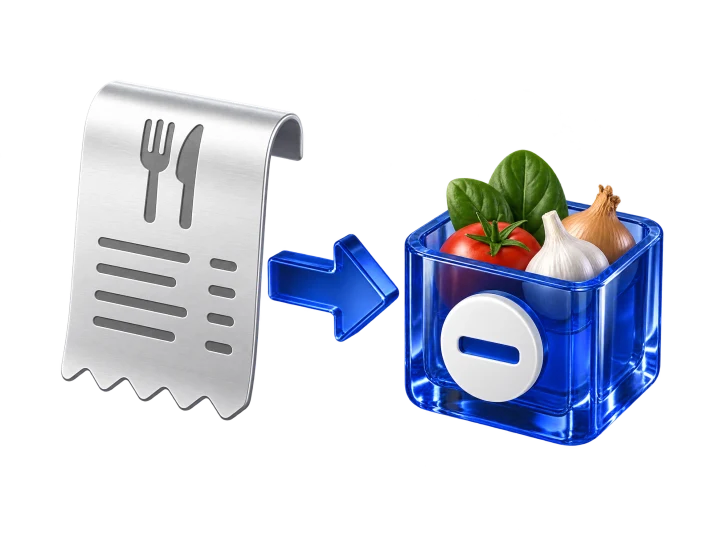
Turn each sale into recipe-based ingredient deductions.

Explore all 18 recipe features

01 / Recipe cards

Ingredients, preparation
and cost per serving.

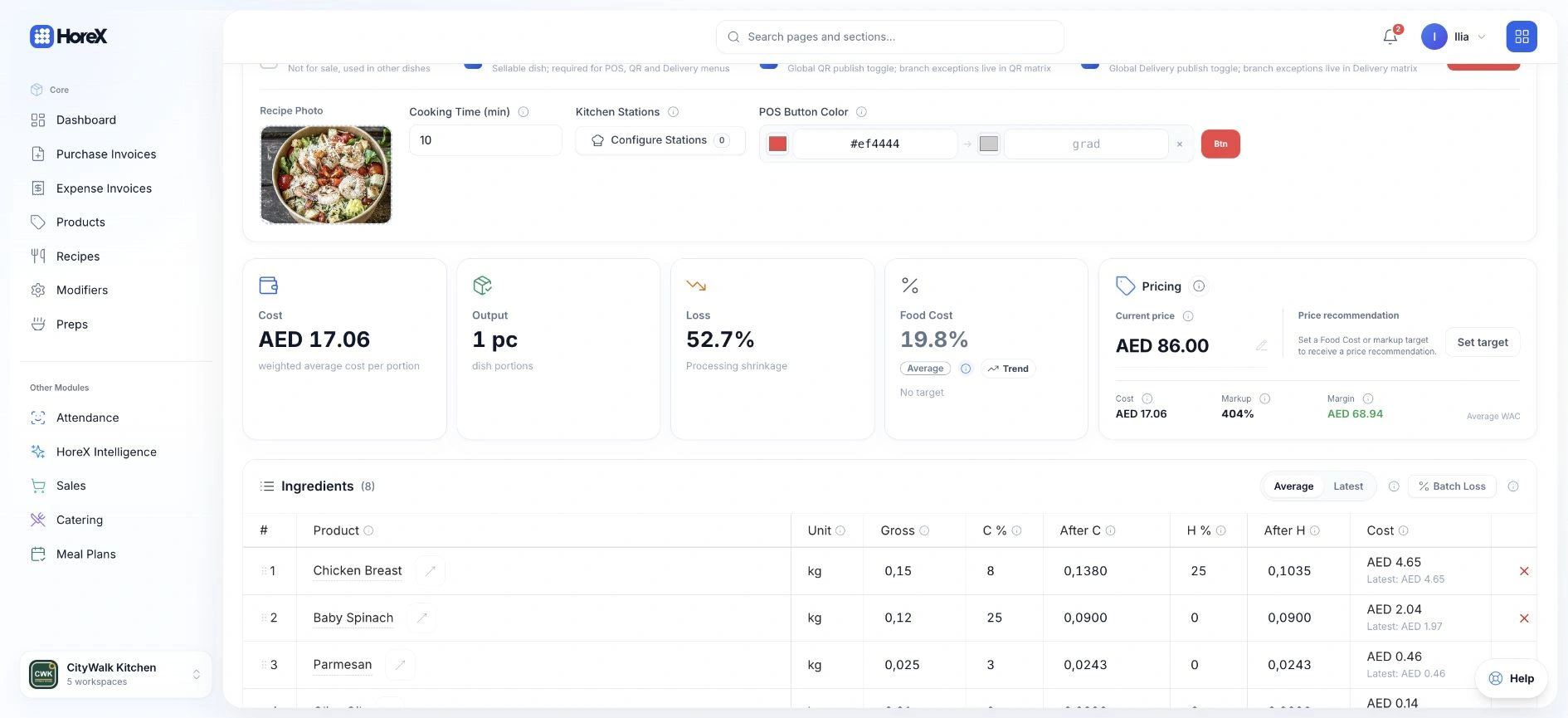
Keep ingredients, quantities, preparation steps and photos in each recipe card. HoreX calculates the cost per serving from the ingredients' Weighted Average Cost.

HoreX technical recipe card with cost, selling price and ingredient quantities

When a supplier invoice updates an ingredient price, the costs of recipes using that ingredient are recalculated. Review the dish cost and selling price together before changing your menu.

  • Exact ingredient quantities
  • Real-time WAC costing
  • Unit conversion
  • Preparation instructions
  • Plating photos
  • Cost per serving

02 / Preps & sub-recipes

Sauces, doughs and stocks
shared across recipes.

Create a recipe for a sauce, dough or stock, then use that preparation as an ingredient in other dishes. Its cost is included in the dishes that use it, including nested recipes.

For example, a flour price change updates the cost of bread, pizza dough and pastry made from it. Each preparation also keeps its own yield.

  • Recipe within recipe
  • Multi-level recipe nesting
  • Automatic cost cascade
  • Semi-finished tracking
  • Yield management
  • Shared base recipes
A chef weighing a portion of tomato sauce on a kitchen scale beside fresh pasta

03 / Weights & yield

Ingredient weights
and cooking loss.

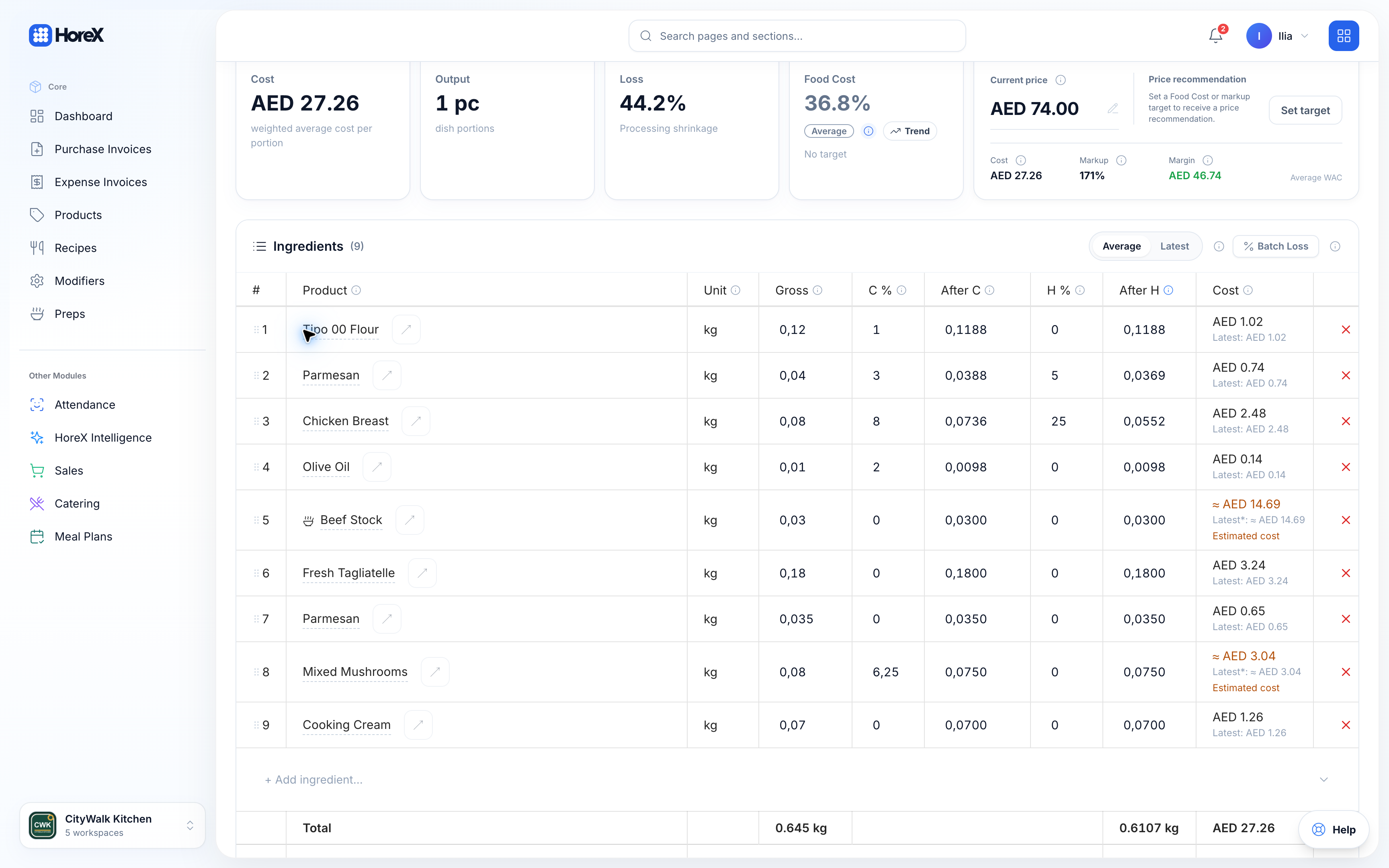
Record cold loss from trimming and peeling, and hot loss from cooking. Use the resulting gross and net quantities to calculate purchasing needs, recipe yield and cost.

Recipe ingredient table with cold loss, hot loss and net weights

Set a serving weight and review the ingredient quantities before and after preparation. This keeps the portion, the cost calculation and the quantities needed in the kitchen connected.

  • Cold loss (trimming)
  • Hot loss (cooking)
  • Gross-to-net conversion
  • Procurement accuracy

04 / Nutrition

Nutrition per serving,
with the ingredient breakdown.

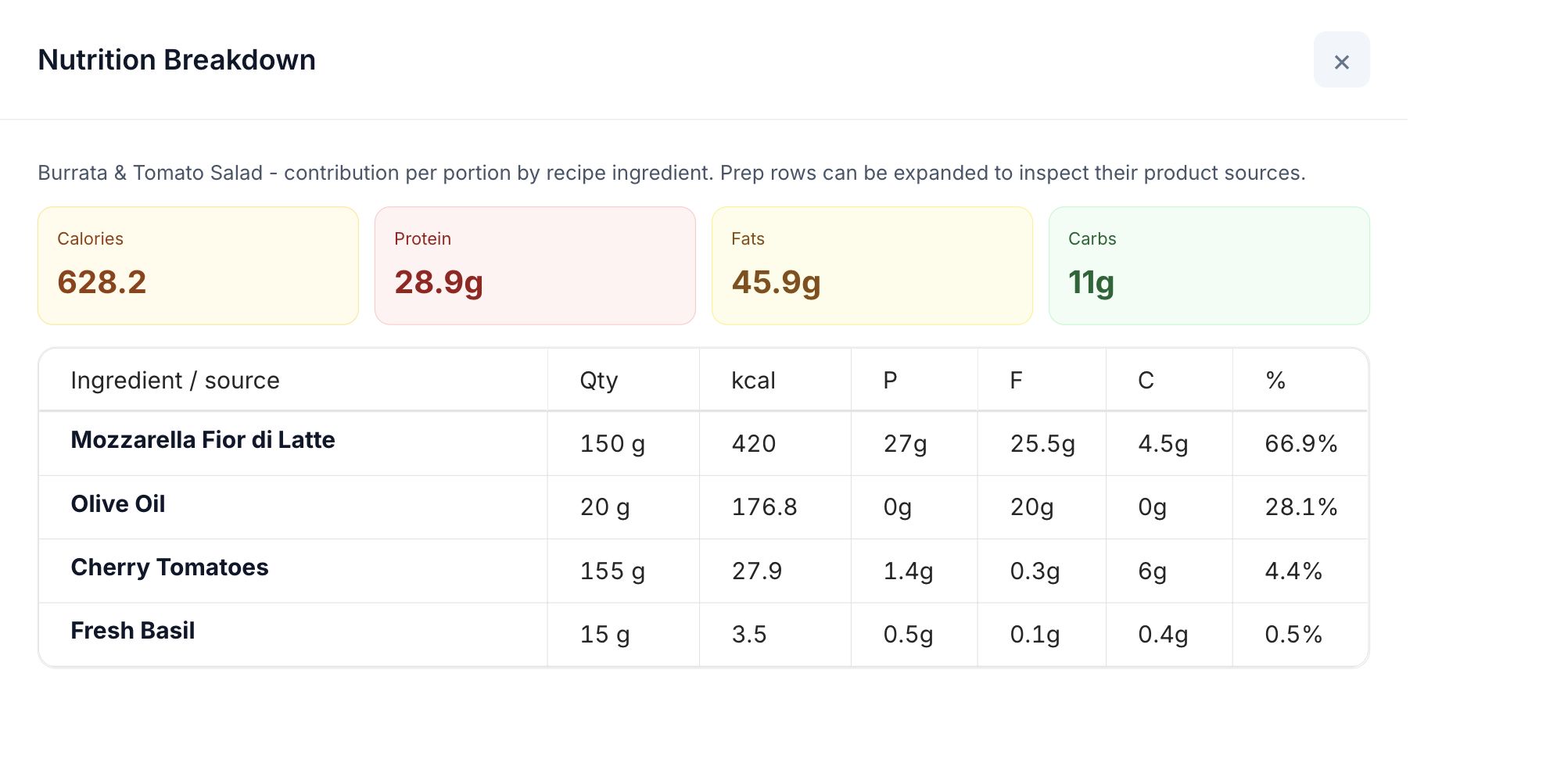
Calculate calories, protein, fat and carbohydrates from ingredient data, recipe quantities and the serving weight. Open the breakdown to see how each ingredient contributes to the total.

HoreX nutrition breakdown for a demo salad, showing calories, protein, fat and carbohydrates by ingredient
  • Nutrition per serving
  • Nutrition labels
  • Per-ingredient nutrition
  • Ingredient source breakdown

05 / Recipe-based consumption

Ingredient deductions
from each sale.

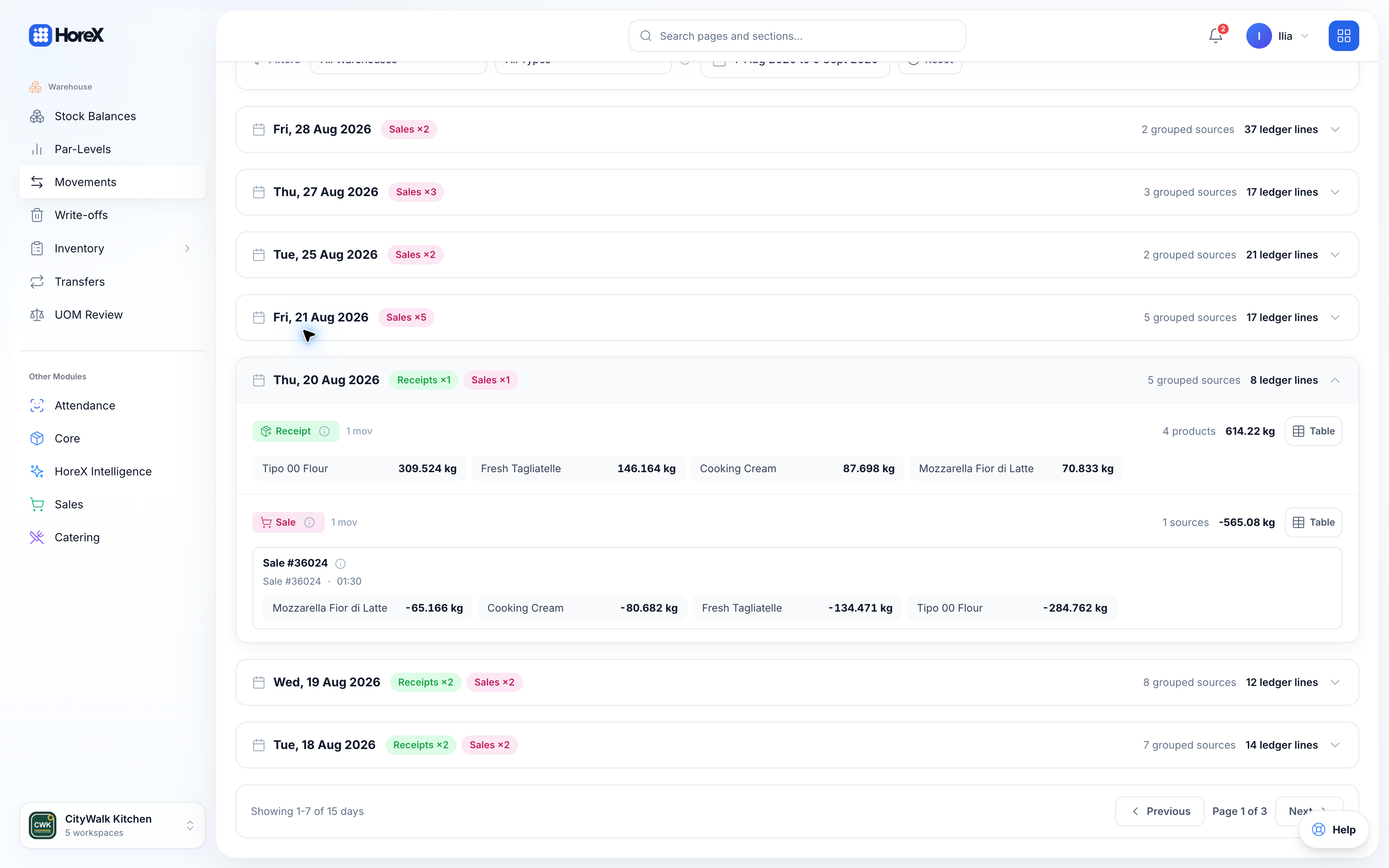
Orders recorded through POS and delivery deduct ingredient quantities using the recipe card. These movements update recorded stock; physical counts are still used to check what is actually in the kitchen.

Ingredient stock deductions linked to a real POS order in the HoreX demo

Compare expected recipe consumption with actual usage and food cost. Differences help you investigate portioning, waste and other stock changes.

  • Auto write-off per sale
  • Recipe-based deductions
  • Real-time stock balance
  • Ideal vs. actual cost
  • Par-level alerts
  • Wastage tracking

Full feature list

Recipe Management features

Open a feature for the full workflow and details.

Recipe cards

Full ingredient breakdown with quantities, units, prep steps, and photos.

See details

Recipe cards

The blueprint for every dish in your kitchen.

Create detailed recipe cards with exact ingredients, quantities, preparation steps, and photos. HoreX calculates the cost per serving automatically using current supplier prices. When prices change — your food cost updates instantly.

How it works

  1. Define ingredients with exact quantities and units
  2. Set preparation instructions and attach plating photos
  3. System calculates cost per serving using WAC — updates automatically

Recipe card capabilities

  • Exact ingredient quantities
  • Unit conversion
  • Real-time cost calculation
  • Preparation instructions
  • Plating photos
  • Cost history tracking

Sub-recipes & nesting

Sauces, doughs, marinades — build once, reuse in any recipe. Costs cascade.

See details

Sub-recipes & nesting

Build once, reuse everywhere — costs cascade automatically.

Create base recipes for sauces, doughs and stocks, then use them as ingredients in other dishes. Costs follow these nested preparations. When a posted purchase updates the cost of flour, review the updated costs of the bread, pizza dough and pastry recipes that use it.

How it works

  1. Create a base recipe with its own ingredients
  2. Use the base recipe as an ingredient in another recipe
  3. When any ingredient price changes, all dependent recipes recalculate

Nesting features

  • Multi-level nesting
  • Automatic cost cascade
  • Semi-finished products
  • Yield tracking
  • Shared base recipes
  • Cross-recipe dependency view

Loss coefficients

Cold and hot loss per ingredient. Accurate gross-to-net weight conversion.

See details

Loss coefficients

Cold loss, hot loss — accounted for automatically.

Every ingredient can have trimming loss (peeling, cleaning) and cooking loss (evaporation, shrinkage). HoreX uses these to calculate the gross weight you need to purchase — so procurement is accurate and costing reflects reality.

How it works

  1. Set cold loss percentage per ingredient (trimming, peeling)
  2. Set hot loss percentage (cooking shrinkage, evaporation)
  3. System calculates gross weight needed for procurement

Loss tracking

  • Cold loss per ingredient
  • Hot loss per ingredient
  • Gross-to-net conversion
  • Procurement accuracy
  • Cost adjustment for waste
  • Per-recipe loss summary

Nutrition data

Calories, protein, fat, carbs — per serving, calculated automatically.

See details

Nutrition data

Calories, protein, fat, carbs — calculated per serving.

Enter nutrition data for raw ingredients and set the recipe quantities and serving weight. HoreX calculates calories, protein, fat and carbohydrates per serving. Open the ingredient breakdown to check the source of each value before using nutrition information in menus, delivery listings or recipe exports.

How it works

  1. Enter nutrition data per raw ingredient
  2. Create a recipe — nutrition calculated automatically
  3. Export nutrition labels for menus and packaging

Nutrition features

  • Per-ingredient nutrition
  • Auto per-serving calculation
  • Exportable nutrition labels
  • Menu display support
  • Ingredient source breakdown
  • Scaled nutrition export

Real-time food cost

Calculate dish costs from ingredient WAC and recipe quantities. Review changes after purchases are posted.

See details

Real-time food cost

See the ingredient costs behind each serving.

Posted supplier purchases update ingredient Weighted Average Cost, which feeds the recipes that use those ingredients. Review the calculated cost per serving alongside your selling price. Keep quantities, units and purchase records accurate, and check any estimated costs before making pricing decisions.

How it works

  1. Supplier purchase posted — ingredient WAC updates
  2. All recipes recalculate cost per serving
  3. Dashboard shows ideal vs. actual with variance alerts

Cost tracking

  • Weighted Average Cost
  • Auto-update on invoice
  • Per-dish profitability
  • Margin alerts
  • Cost trend history
  • Ideal vs. actual comparison

Scaled PDF export

Export recipe cards at original or any scaled portion count with full breakdown.

See details

Scaled PDF export

Print any recipe at any portion count.

Export professional recipe cards as PDF — at original portion size or scaled to 10, 50, or 500 servings. Includes ingredient breakdown, costs, nutrition, and photos. Perfect for kitchen printing or staff training.

How it works

  1. Open a recipe and select "Export PDF"
  2. Choose original or custom serving count
  3. Download professional PDF with full breakdown

Export features

  • Original or scaled portions
  • Full ingredient breakdown
  • Cost per serving
  • Nutrition data included
  • Preparation photos
  • Professional layout

Auto stock write-off

Recorded sales deduct ingredients using recipe quantities and update stock records.

See details

Auto stock write-off

Sell a dish — ingredients deduct automatically.

When a dish is sold through POS or a connected delivery channel, HoreX records ingredient deductions from its recipe card. Linked preparations resolve to their ingredients. These records show expected stock balances; physical counts are still needed to check what is actually in the kitchen.

How it works

  1. Dish sold through POS — system looks up recipe card
  2. Each ingredient deducted from warehouse stock by exact quantity
  3. Stock dashboard shows remaining balance in real time

Write-off features

  • Recipe-based deduction
  • Real-time stock levels
  • Multi-ingredient recipes
  • Branch-aware warehousing
  • Semi-finished chains
  • Write-off audit trail

Ideal vs. actual cost

Compare what the recipe should cost vs. what your kitchen actually consumed.

See details

Ideal vs. actual cost

Compare recipe-based cost with recorded stock usage.

Compare the cost expected from recipe quantities and recorded sales with actual usage for the same period. Opening and closing counts, receipts, transfers and other movements establish that usage. Review differences by dish, period and branch, then check portions, waste, receiving records and count accuracy to find the cause.

How it works

  1. System tracks ideal cost (recipe × units sold)
  2. Actual usage comes from opening and closing counts, with receipts, transfers and other stock movements
  3. Dashboard shows variance — managers investigate

Variance features

  • Per-dish variance
  • Period comparison
  • Branch-level breakdown
  • Waste detection
  • Over-portioning alerts
  • Trend analysis

Recipe photos

Attach plating photos to every recipe card. Visible in recipe card export and menu.

See details

Recipe photos

Every dish documented visually.

Attach plating photos to every recipe card. New staff see exactly how the dish should look. Photos appear in PDF exports, on the menu, and in training materials.

How it works

  1. Upload a plating photo when creating the recipe
  2. Photo appears in recipe detail and PDF export
  3. Kitchen staff reference for plating consistency

Photo features

  • Photo upload per recipe
  • Visible in PDF export
  • Menu integration
  • Training reference
  • Multiple photos support
  • High-resolution storage

Combos & set menus

Group multiple recipes into combo meals with combined cost and nutrition.

See details

Combos & set menus

Group dishes into combo meals with combined costing.

Create combo recipes that bundle multiple dishes (starter + main + drink). Each component retains its own recipe card, but the combo gets a combined food cost, nutrition calculation, and selling price with margin analysis.

How it works

  1. Create a new combo recipe
  2. Add existing dishes as components
  3. System calculates combined cost, nutrition, and margin

Combo features

  • Multi-dish bundles
  • Combined food cost
  • Combined nutrition
  • Margin analysis per combo
  • Shared inventory write-off
  • Menu pricing support

Unit conversion

kg → g → ml → pcs — automatic conversion between measurement units.

See details

Unit conversion

kg, g, ml, L, pcs — automatic conversion.

Buy chicken in kilograms, use it in grams on the recipe card. HoreX handles all unit conversions automatically. Define custom conversion factors for your specific ingredients (e.g., 1 piece of lemon = 80g).

How it works

  1. Set base unit for each ingredient in catalog
  2. Use any compatible unit on the recipe card
  3. System converts automatically for cost and write-off

Conversion features

  • Weight units (kg, g)
  • Volume units (L, ml)
  • Piece counting
  • Custom conversion factors
  • Cross-unit procurement
  • Automatic cost scaling

Modifiers & variations

Extra cheese, no onion — modifiers with independent cost impact on the recipe.

See details

Modifiers & variations

Extra cheese, no onion — costed independently.

Define modifiers (add-ons, removals, substitutions) with independent ingredient lists and cost impact. When a guest orders "extra cheese" — the modifier's ingredients are added to the write-off and the cost adjusts automatically.

How it works

  1. Create modifier groups linked to menu items
  2. Define each modifier with its own ingredient list
  3. POS applies the modifier — cost and write-off adjust automatically

Modifier features

  • Ingredient-linked modifiers
  • Cost impact per modifier
  • Write-off adjustment
  • Modifier groups
  • Free & paid modifiers
  • Modifier reporting

Menu pricing & margin

Set selling price, see margin percentage. Food cost target alerts.

See details

Menu pricing & margin

Set the price. See the margin. Hit your target.

Set the selling price on the recipe card and instantly see the food cost percentage and gross margin. Set target food cost thresholds — if a recipe exceeds the target (e.g., 30%), the system alerts you.

How it works

  1. Define selling price on the recipe card
  2. System calculates food cost % and margin
  3. Alerts fire when cost exceeds target threshold

Pricing features

  • Selling price per recipe
  • Food cost percentage
  • Gross margin calculation
  • Target cost alerts
  • Price comparison
  • Multi-channel pricing

Recipe cloning

Duplicate any recipe as a starting point for variations. Clone and edit in minutes.

See details

Recipe cloning

Duplicate. Tweak. Launch a new dish in minutes.

Don't start from scratch. Clone any existing recipe as a starting point for a new variation. Change a few ingredients, adjust portions, update the name — and you have a new recipe with accurate costing from minute one.

How it works

  1. Select a recipe and tap "Clone"
  2. Edit ingredients, quantities, or name
  3. Save as a new recipe with its own cost calculation

Cloning features

  • One-click duplication
  • Full ingredient copy
  • Independent cost tracking
  • Category assignment
  • Photo carryover
  • Version independence

Cost history tracking

See how a recipe's food cost changed over time. Price trend per ingredient.

See details

Cost history tracking

See how your food cost changed over time.

Every recipe maintains a cost history — see how the food cost per serving has changed week-over-week, month-over-month. Identify which ingredients are driving cost increases and negotiate with suppliers armed with data.

How it works

  1. System logs recipe cost on every recalculation
  2. View cost trend chart per recipe
  3. Drill down to see which ingredients drove changes

History features

  • Per-recipe cost timeline
  • Ingredient-level breakdown
  • Period comparison
  • Cost spike detection
  • Supplier price correlation
  • Export cost reports

Bulk recipe import

Import recipes from spreadsheets. Map columns to ingredients — bulk onboarding.

See details

Bulk recipe import

Onboard hundreds of recipes from a spreadsheet.

Moving from another system? HoreX supports bulk recipe import from Excel/CSV. Map your columns to ingredients, quantities, units, and costs — upload once and all recipes are created with proper structure and costing.

How it works

  1. Prepare your recipe spreadsheet with standard columns
  2. Map columns to HoreX fields in the import wizard
  3. Upload — recipes are created with ingredients and first cost calculation

Import features

  • Excel/CSV support
  • Column mapping wizard
  • Ingredient matching
  • Unit conversion
  • Validation & error reporting
  • Batch creation

Recipe access control

Control who can view, edit, or delete recipes. Role-based permissions.

See details

Recipe access control

Control who sees costs, edits recipes, or exports.

Recipe cards contain sensitive financial data — food costs, margins, supplier prices. HoreX lets you control who can view recipe costs, who can edit recipes, and who can export PDFs. Kitchen staff see the recipe instructions; managers see the cost breakdown.

How it works

  1. Admin defines recipe permissions per role
  2. Chef role: view recipes, not costs. Manager: full access
  3. Permission system enforces visibility and edit rights

Access features

  • View/edit/delete permissions
  • Cost visibility control
  • Export restrictions
  • Role-based access
  • Audit trail
  • Per-category permissions

Frequently asked questions

What is a recipe card in HoreX?

A recipe card is a detailed digital document that defines every ingredient, quantity, loss coefficient, preparation method, and cost for a dish. HoreX calculates the food cost per serving automatically based on current supplier prices using Weighted Average Cost.

How does HoreX calculate food cost per dish?

HoreX uses Weighted Average Cost (WAC) for every ingredient. When you create a recipe card, the system multiplies each ingredient quantity by its current WAC price, applies loss coefficients, and calculates the total cost per serving. This updates in real time as supplier prices change.

Can I use sub-recipes inside other recipes?

Yes. HoreX supports multi-level recipe nesting. A sauce recipe can be an ingredient in a main dish, which can be part of a combo. Costs cascade automatically — when a base ingredient price changes, every recipe that uses it updates instantly.

Does HoreX support loss coefficients?

Yes. Each ingredient can have cold loss (trimming, peeling) and hot loss (cooking shrinkage) coefficients. HoreX calculates the gross weight needed to achieve the net weight in the recipe.

Can I export recipe cards as PDF?

Yes. HoreX generates professional PDF recipe cards with full ingredient breakdown, costs, nutrition data, preparation instructions, and photos. Export at original portion size or scaled to any number of servings.

Does HoreX support combos and set menus?

Yes. Create combo recipes that group multiple dishes together. The combo gets its own combined cost, nutrition data, and margin calculation.

Can I import existing recipes?

Yes. HoreX supports bulk recipe import from spreadsheets. Map your columns to ingredients, quantities, and units — onboard hundreds of recipes in minutes.

How does ingredient cost update?

Every time a supplier invoice is processed, ingredient costs update via Weighted Average Cost. All recipes using that ingredient recalculate automatically — no manual price updates needed.

See recipe management in HoreX.

Go through a recipe, its ingredient costs and the stock movements from a sale.